JSX Syntax Colors with Visual Studio Dark Theme
Answered

So I finally got ReSharper working with ES6 and JSX highlighting. But now I can't read half my JSX because I'm using Visual Studio 2013's dark theme.
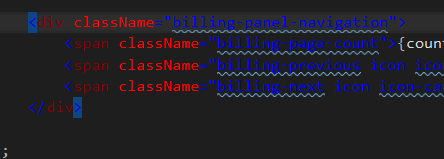
I went through the fonts and colors display items already, and changed every dark unreadable blue and purple with a ReSharper prefix to something lighter, but this never changed these lines. So where can I change these to be readable?
Alternatively what file would these colors appear in so I can hack them to anything besides blue on black?
Please sign in to leave a comment.
Hello Nicholas
Does such issue affect JSX entities only? Since we saw similar problems from using directives or TODOs items and the following steps help usually https://resharper-support.jetbrains.com/hc/en-us/articles/206546479-ReSharper-Fonts-Colors-settings-do-not-appear-in-Visual-Studio-after-installation.
Please try executing them as well/
Thanks!
That did it. Thanks again.
Brilliant! Thanks for the update!
How did you get ES6 and JSX highlighting to work?
I've tried setting the Javascript Language Level to ES6 and Experimental. And I've ticked the box to 'Enable JSX syntax in JS files'.
But my JSX (in JS files) is not being highlighted correctly. Any help would be appreciated.