Xamarin.Android and Xamarin.iOS projects not finding symbols from .NET Standard 2.1 assembly

I have a .NET Standard 2.1 library assembly in my project which is referenced by my Xamarin.iOS and Xamarin.Android projects. It builds fine and works find in vanilla Visual Studio, but with Resharper enabled, I get a red highlight and a "Cannot resolve symbol" underneath the symbol in the tooltip, even though the symbol is clickable and takes me to the correct area.
For example, I can click either of the "App"s here and get to the correct class/constructor:
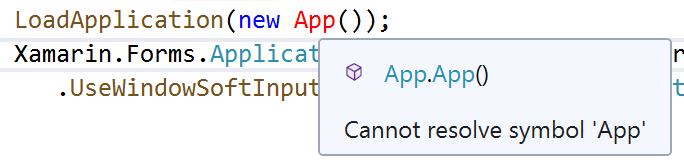
These also show in the errors/warnings solution windows, and any using statements that reference namespaces in that assembly will get removed if I use "Cleanup Code" (but not if I select "Remove and Sort Usings".
Please sign in to leave a comment.
Oh yes, this is with ReSharper Ultimate 2019.2.2 on Visual Studio Community 2019 version 16.3.2.
Hello,
Thank you for the feedback.
Could you please check if the problem is reproduced in a brand new solution?
Could you please also try disabling ReSharper | Options | Environment | General | Read solution model directly and check if it the problem is still reproduced.
Thank you.
Yes, this can be reproduced easily in a new solution, and persists regardless of the setting in the "read solution model directly" checkbox. Reproduction steps:
I've pushed a minimal reproduction to https://github.com/bangfalse/ResharperXamarinMinimalRepro. The only change I made from the default template was the framework upgrade: 7609d931380c89496eb6a956340c53a9fc8688f0
Hello jyorke,
Thank you for the provided info.
Have you tried disabling ReSharper in VS Tools | Options | ReSharper Ultimate tab?
I reproduced the same behavior with ReSharper, but the errors don't go away with disabled ReSharper. It's Roslyn showing errors: "The type or namespace name 'App' coudd not be found", please see attached screenshot.
Thank you.
Hi
I am having the same issue. In my solution I have a .NET Standard 2.1 project which is referenced by a Xamarin Forms Android project.
In MainActivity.cs is has a problem finding the App class. But, the projects will build and run even though ReSharper indicates there is a problem.
If I change the class library project to a .NET Standard 2.0, then ReSharper recognises the App class.
To reproduce:
Hello MotoSV,
Please refer to my previous comment. Please try disabling ReSharper and go to MainActivity.cs. Most probably you see that App is highlighted and the error appears in VS Errors list (Build+Intellisense selected) as shown in the screenshot - https://resharper-support.jetbrains.com/hc/user_images/UTzP589US4Vu0-DnS_WWrQ.png
Thank you.
Hi Angelina
With the class library using .NET Standard 2.1 and the error visible I disabled ReSharper. On doing this the error disappared and there were no errors or warnings in the Error List tab. When I switched ReSharper back on the error reappeared.
The project I tried was a brand new Xamarin Forms project. All the correct references and using statements are in place. But,when the class library uses 2.1 I get the error. Switch to 2.0 and the error disappears.
The above image shows the two errors I get from ReSharper in MainActivity.cs with .NET Standard 2.1. Even with these two errors being reported the project compiles and runs.
I am using ReSharper 2019.2.2 and VS 2019 16.3.2.
Yes, this error does not appear with ReSharper disabled.
Hello,
Could anyone of you please try the following:
1. Reproduce the issue
2. Navigate to the error that ReSharper highlights
3. Disable ReSharper
4. Provide the screenshot of the editor.
Thanks in advance.
Hi Angelina
This is with ReSharper enabled:
And this is with ReSharper disabled:
The solution explorer:
As mentioned this is a File->New Project and the only things to change are the namespace of the App class (XAML & C#) and the class library to .NET Standard 2.1:
In this example I have App in a different namespace because that is how I have my project setup. But, even with App in the same namespace as MainActivity.cs I get the error.
If I open the solution and have MainActivity.cs visible I can there is no error. Once ReSharper is initialised the error becomes visible. In all instances if I "Alt+Enter" ReSharper gives me the option to 'Create type App' or 'Create nested type App'.
Thanks
It appears this issue has been fixed in v2019.2.3. (https://youtrack.jetbrains.com/issue/RSRP-476418)