How can I change a CodeGeneration-Template of a ReSharper ContextAction

I am using the current ReSharper 2018 in VisualStudio 2015 and VisualStudio 2017.
There I can use ReSharper Context Actions to extend a property with a backing field and a call to this.RaisePropertyChanged(). So for example I have the following class and property:
public class ReSharperDemo : NotificationObject
{
    public string DemoProperty { get; set; }
}
and when using the following Context Action
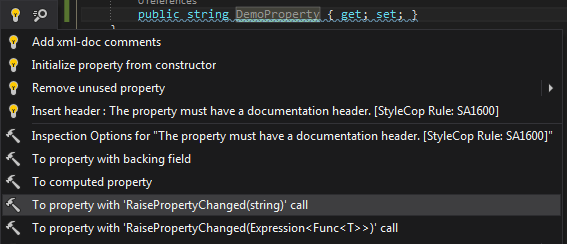
ReSharper generates the following code:
public class ReSharperDemo : NotificationObject
{
    private string _demoProperty;

    public string DemoProperty
    {
        get
        {
            return this._demoProperty;
        }
        set
        {
            if (value == this._demoProperty) return;
            this._demoProperty = value;
            this.RaisePropertyChanged(nameof(this.DemoProperty));
        }
    }
}
This all works quite well, but I am not a friend of the one liner
if (value == this._demoProperty) return;So every time I will have to go back and surround it with { ... }
So my question is:
Is there a way to change the template, so that it will produce the following code:
public class ReSharperDemo : NotificationObject
{
    private string _demoProperty;

    public string DemoProperty
    {
        get
        {
            return this._demoProperty;
        }

        set
        {
            if (value == this._demoProperty)
            {
                return;
            }

            this._demoProperty = value;
            this.RaisePropertyChanged(nameof(this.DemoProperty));
        }
    }
}
I already looked at the Resharper Templates Explorer, but I did not found the template there. And also a look at the ReSharper Help - Code Templates was not successful.
Please sign in to leave a comment.
Hello Martin!
You could try ReSharper | Options | Code Editing | C# | Code Style | Braces | In if statement to change to Enforce always. In such case ReSharper will suggest to add braces after context action has been applied. It should be done by default but unfortunately there's an issue with code style settings not applied to context actions - https://youtrack.jetbrains.com/issue/RSRP-455917. You are welcome to comment or vote for it.
There's also Structural Search and Replace feature - https://www.jetbrains.com/help/resharper/Navigation_and_Search__Structural_Search_and_Replace.html, though it cannot be context sensitive. It just replace one pattern with another one.
Thank you.
Hello Angelina,
Thank you for your response.
I’ve played with the different Brace Styles, but as you already mentioned, it does not work. I left a vote for this issue.
The ‘Structural Search and Replace’ feature is new for me and I will take a deeper look into it, but on the first look, it does not really fit my needs.
Reading what is not written here:
My interest in changing this template also results from some code bases, where the whole
moved to a single method call
So it would be very helpful to adjust the template in this case.
Thanks,
Martin