Resharper does not scan files until they are open

Ever since Resharper C++ 2025 it does not work as it was before. When I open the solution it does not scan symbols from the files until I open them. It affects symbols search, find usages, go to derrived/base. The only thing that works is text search.
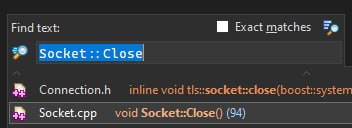
Illustrated example. I closed all the files in VS and reopened it. Symbol search seems to only work for std methods and cannot find anything defined in the solution

But the text search works fine:
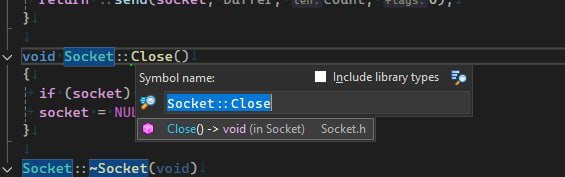
And after I open the file, the symbols in the opened file are again considered by search and find usage, etc
The problem persists with R# In and Out-of-process. I have also double checked exclusion settings so that they do not include any code of my project. Same behavior can be seen with 2026 version
The last version that everything works correctly on is 2024.3.9. After I open the solution with this version, it goes though a short process of indexing and then all the features work as intended. Coincidently, my license covers this version perpetually, so I can use it for free at least. But I would like to use newer versions.
Maybe there is some hidden option that make R++ only index opened files that was added in 2025 version?
Please sign in to leave a comment.
Hello,
If a .cpp file does not get indexed, most likely R# either thinks the file is excluded from the build process, or Visual Studio does not provide compilation properties for that file.
Would you be able to share a solution where we can investigate? If no, what kind of a solution is that, .sln or CMake?
Unfortunately, I cannot share the project
It is a .sln solution. And again, 2024 works just fine with the same settings
With socket.cpp, could you please check if you have “Excluded from Build” set to “Yes” for this file? Does socket.cpp get compiled in the active configuration?
Are you able to reproduce this on a small new solution or does this problem happen only in your current solution? Would you be able to share some additional diagnostics with us that include project information details (like file names, etc.)?
It is not excluded from the build.
I have managed to create a small project in our build system and extract it. It does not build, because the build system itself is proprietary, but the behavior can be reproduced. You can find it on my GitHub
STR
1. Open
TestProj\project\TestProj.vcxproj. Make sure no files were opened. If they were opened, close all and restart the VS2. Open
Resharper→Navigate→Go to Symbol..3. Input
TestClassR++ 2024.3.9
R++ 2026.1
4. From the solution explorer open
TestClass1.hpp4.1. Reopen
Go to Symbol..R++ 2026.1:
5. RMB on
TestClass1→Navigate→Derrived SymbolsR++ 2026.1:
6. Click
t1.Resharper→Navigate→Show UsagesR++ 2024.3.9:
R++ 2026.1:
7. Open
TestClass1.cpp. Return toTestClass1.hppand find usages oft1R++ 2026.1:
8. Open
TestClass2.hpp. Repeat step 5. Now in 2026.1 version it correctly navigates to the derived class. But still fails to find t1 usages outside ofTestClass1.cpp9. Open
TestClass2.cpp. Repeat step 7. Now 2026,1 version can correctly find usages in TestClass2.cppR++ 2026.1:
10. Open
TestProj.cpp. After this 2026.1 version can find usages ofPrint()method (which 2024.3.9 version could find without opening this file)I hope this helps to find out the reason why the new version don't work when 2024 works as expected. I've noticed that the projects we have are using NMake. When I open the project that uses MSBuild ClCompile everything works in both the new version and the 2024 version of R++.
Thanks for the test project!
You seem to be using
CustomBuildMSBuild task to include your files inside the .vcxproj instead ofClCompile. Just curious, is there some specific reason for that? Visual Studio API that we use to read compilation properties doesn't report theCustomBuildfiles for some reason, so R# does not index these files. If you replaceCustomBuildwithClCompilein the .vcxproj file in your test project, R# should listTestClassin go to results after solution is opened.Oh, yes, it works. After I converted manually cpp files to ClCompile and headers to ClInclude, Resharper 2026 parsed files at the launch and everything worked.
Unfortunately, it is the way FastBuild generates solutions. I did not find any way to make it use ClCompile and ClInclude. I guess it is because it does not use MSBuild, which relies on the those tags.
I guess, as a workaround, I will write the script that will run after project generation that will convert CustomBuild into needed tags. it seems that they do not break anything for building the project.
Thank you for your help.
Thanks!
I can't find why FASTBuild uses
CustomBuild, but looks like even their developers are not sure:As a workaround, please try disabling the “Read C++ compilation properties from Visual Studio API …” setting and save this change to the team-shared layer so that everybody will use it:
This will make R# read compilation properties directly from MSBuild, and the
CustomBuildfiles should get indexed.Yeah, it works. But it causes multiple false positives for error detection. For example, it highlights all ‘size_t’ as ambigous (2024.3 does not do it, as well as replacing CustomBuild with ClCompile trick). So I guess replacing manually the tags works best in my case
If
size_tis ambiguous, then R# incorrectly detected your platform (i.e. 32-bit vs 64-bit). Maybe we can fix that? I guess this could be something specific to projects generated by FastBuild again. In a usual NMake-based project we look at theTargetMachineMSBuild property, which I guess gets set by one of the standard properties files:<ImportGroup Label="PropertySheets" Condition="'$(Configuration)|$(Platform)'=='Release|x64'"><Import Project="$(UserRootDir)\Microsoft.Cpp.$(Platform).user.props" Condition="exists('$(UserRootDir)\Microsoft.Cpp.$(Platform).user.props')" Label="LocalAppDataPlatform" /></ImportGroup>Would you be able to attach a sample project where you get this error?