How to sort public fields of a struct with 'File Layout' for c#
Answered

Hi All,
What I am looking for is what should an entry in ‘File Layout’ look like.
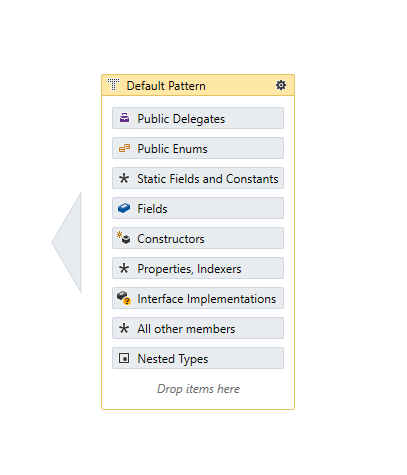
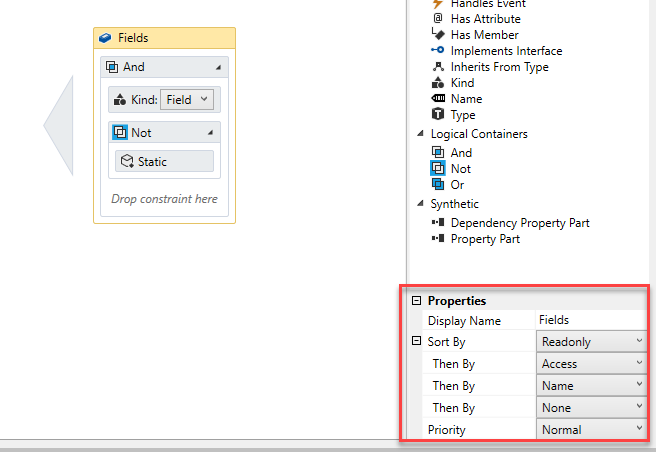
This works fine for a class

But not for a struct

Is there a way to sort the members of a struct?
Please sign in to leave a comment.
Hi Marco,
The behavior you see is by design: structs are excluded from member reordering by the default File Layout pattern, so your layout that works for classes will not affect structs until you change that restriction. This was done deliberately: Physical layout of structs in managed memory corresponds to the order of its fields. Hence, changing the order of struct's fields might change program behavior if that struct is used in interop.
If you want to change this default behavior, you can do the following:
1. Open ReSharper Options and go to the
Code Editing | C# | File Layoutpage,2. Click the Patterns button,
3. Switch to XAML view (click the XAML button),
4. Find the
TypePatternnamed"Non-reorderable types"(its snippet is listed below).5. Remove the
<Kind Is="Struct" />constraint from that pattern, leaving the rest intact:6. Click Save
Hi Andrey,
Thank you for your eleborate response.