Silet Cleanup is not so silent (actually visually annoying when using a dark themed IDE)

Hello,
when using Silent Cleanup, especially if applied on the entire file (not just a piece of selected code), a pop-up briefly shows up showing the progress of the cleanup, even if it's for a second or less, the problem with it is that it's mostly white, so basically whenever performing silent cleanups (automatically on save or manually), I'm getting flashed by its brightness in contrast with the dark themed IDE (VS2026 in this case)
I mean look at it, it etches on your retina when it flashes against a dark background
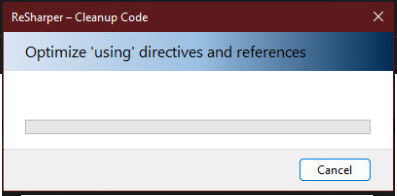
I absolutely love ReSharper and I believe it's the greatest thing that happened to the VS IDE, and I apologize if I come across as too crude or blunt when talking about this and making the following request, but please do something about it.
In the Code Editing > Code Cleanup > General page you could offer an option to not show the popup/progress window, maybe just have an indicator somewhere, or a busy cursor, or nothing. At the very least, please make it be dark (theme aware), the biggest issue is its contrast against dark backgrounds.
Thank you very much!
Please sign in to leave a comment.
Hello Greg Kilmatead, thank you for your message. It looks like the following issue describes your request about the popup not appearing: RSRP-499839 Stop displaying a code cleanup popup when saving a file. As for making the popup dark-colored, I’ve also created a separate task for that just in case: RSRP-502485 Silent Cleanup: popup should be dark in dark theme. Please feel free to comment on them or vote for them to stay updated on any status changes. Let me know if you have any questions. Thank you!
Maria Pleskunina Thank you!