C# Autocomplete cycling with arrow keys not working until ESC key is pressed

When typing in parameters for a function the arrow keys do not work to cycle through the autocomplete suggestions until ESC key is pressed. It seems as if the function signature tooltip is hijacking the focus.
Please see screen recording https://imgur.com/a/62YHPMf After this I re-launched VS and could not reproduce it again in this specific case, but this issue pops again and again. Another example below:
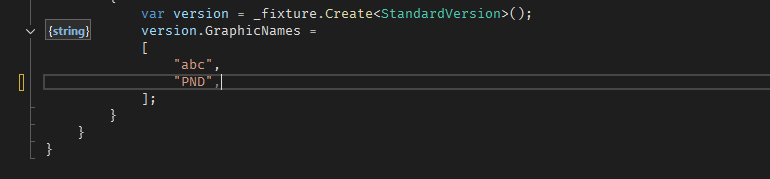
After adding comma the `{string}` tooltip appears and my cursor keys do nothing until I hit ESC to close the tooltip.
I've been using ReSharper for many years, but this started happening only recently (a month maybe). Unfortunately I can't pinpoint any event that could have caused it like VS update or ReSharper update.
It is possible not even ReSharper issue, but some conflicting settings. Not sure. But this does not happen with ReSharper disabled.
I'll appreciate your help.
Microsoft Visual Studio Professional 2022 (64-bit) - Current
Version 17.14.3
ReSharper tried two versions:
JetBrains ReSharper 2024.3.2
Build 243.0.20241210.180528 built on 2024-12-10
and
JetBrains ReSharper 2025.1.4
Build 251.0.20250617.82607 built on 2025-06-17
Please sign in to leave a comment.
Hi J Locans!
Unfortunately, I can't reproduce the issue for now.
On the screenshot, I see that
{string}steals the focus, but I don't notice the same on the video you attached. What happens if you try to type anything when this happens and{string}appears?Also, it could indeed be related to some settings.
Please collect the following information:
ReSharper | Manage Options => "Export to File"in the context menu for each layer;Tools | Import and Export Settings.Upload files to our server and share the uploadID.
Thank you in advance!
Hi Alexandra Guk !
I believe that in the screen recording scenario there was no other tooltip visible other than the function signature one. In both cases I can continue typing or moving left/right. Only up/down seems to be affected.
I have since moved to VS2026 and upgraded ReSharper as well, but the issue is pretty consistent.
Upload id: 2026_02_20_M46a2ucY464Shz1c9cFezu (files: Exported-2026-02-20.vssettings and 3 more)
I just found an additional detail to this - there is a chance that the `{string}` tooltip doesn't close when switching tabs and in that case I found no way to get rid of it (it still blocks up/down keys) except by switching to the tab that initially spawned it and hitting ESC. You can see screen recording here: https://imgur.com/a/lfHS7aZ
At first the tooltip disappears when switching tabs, but on second try it stays open.
Hi J Locans ,
We've managed to track down the reason behind the behavior you observe. Basically it's by design of the Parameter Information feature when the arrow keys are chosen to switch between.
Just change the ReSharper | Options | Environment | IntelliSense | Parameter Info | Switch between signatures with to “Parameter Info Command (Ctrl+Shift+Space)”:
Thank you Andrey Simukov ! This solves the issue.
Hi J Locans
May I ask you one more detail about the issue on your side? Did you use the Out-of-Process mode (Extensions | ReSharper | R# Out-of-Process | Switch to Out-of-Process Mode) while experiencing the issue?
Andrey Simukov I did not.
J Locans Thank you!