Build 81 Problem with loop template

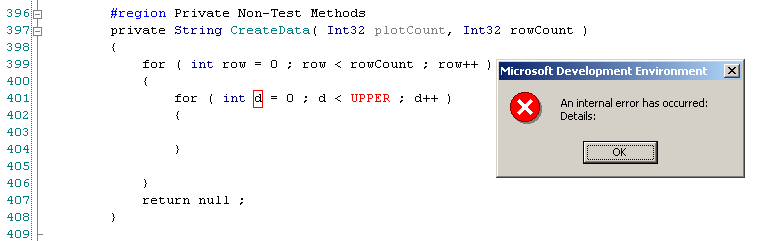
I've experience a very nasty problem using the loop template via ctrl+j. As
soon as I hit tab to go to the next field I get a dialog with text:
-
Microsoft Development Environment
-
An internal error has occurred:
Details:
-
OK
-
I've attached a screenshot of this in the IDE. Unfortunately, closing and
re-opening the file does not fix it. I have to close and reopen VS.NET. I
can reproduce this on my Win XP laptop and my Win 2000 desktop. Has anyone
else seen this?
Thanks,
Derek Price
Attachment(s):
ResharperLoopError.png
Please sign in to leave a comment.
Heya,
Tried some variations (e.g. enter vs tab, nested loops) and can't reproduce
on my main rig. :(
/jhd
"Derek Price" <dprice@doble.com> wrote in message
news:c8d99l$318$1@is.intellij.net...
As
>
>
>
I
anyone
>
>
>
>
DP> Has anyone else seen this?
Yes, it's perfectly reproducible. Just one additional note -- you should try
to enter your own variable name instead of suggested one. After I press any
key (e.g. 'w') the syntax highlighting turns off. The subsequent attempts to
use IDE editor bring up the error box.
Regards.
Hello,
Starting from build #82 I'm no longer able to reproduce this problem, so it
appears to be fixed (at least for me =)).
Regards.
Same here!
Derek Price
"Maxim Babenko" <mab@shade.msu.ru> wrote in message
news:c94a7g$jcn$1@is.intellij.net...
>
it
>
>
>