Locals coloring in VS2005

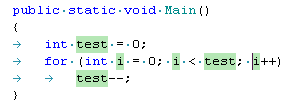
I just installed 203 with VS2005. Attached is a screenshot illustrating the problem: locals (and also parameters) are colored with a strange background. I looked through the settings listed in Tools|Options|Environment|Fonts and Colors but did not find any type which
is denoted as belonging to Resharper
has this kind of backgound
So I see no way to get rid of this color =(
Did I miss some option?
P.S. When I disable Resharper from Tools menu the strange colors go away. So these are definitely highligthers inserted by Resharper.
Attachment(s):
colors.bmp
Please sign in to leave a comment.
Go to the Visual Studio "Tools" menu and select "Options". Then select
"Fonts and Colors" from the list. Scroll down to the "Resharper" entries
(in particular "Resharper Local Variable" and "Resharper Parameter"). Do
you not see any Resharper entries? That would definitely be strange.
"Maxim Babenko" <mab@shade.msu.ru> wrote in message
news:4696632586225730781250@news.intellij.net...
I just installed 203 with VS2005. Attached is a screenshot illustrating the
problem: locals (and also parameters) are colored with a strange background.
I looked through the settings listed in Tools|Options|Environment|Fonts and
Colors but did not find any type which
is denoted as belonging to Resharper
has this kind of backgound
So I see no way to get rid of this color =(
Did I miss some option?
P.S. When I disable Resharper from Tools menu the strange colors go away. So
these are definitely highligthers inserted by Resharper.
Well, I see these entries. However, the colors are completely different from what I see in the editor tab -- see attachments.
Attachment(s):
colors2.bmp
Hello Maxim,
actually there is currently some weirdness in how the ReSharper highlighting
works in VS 2005 Beta 2
(also in June CTP). In particular, not all our 'display items' get colored
properly - some of them (like
local variables and parameters) seem to get random colors sometimes. Moreover,
sometimes you may observe
ugly colors like black background and foreground. We don't know the source
of this problem, but we're
almost sure that it is a bug in VS 2005, since we use exactly the same mechanism
for registering our
'display items' as in ReSharper for VS 2003 where it works fine. We've posted
the description of this
issue to various Microsoft newsgroups, but so far we have no luck receiving
a reply.
Regards,
Dmitry Shaporenkov
JetBrains, Inc
http://www.jetbrains.com
"Develop with pleasure!"
>> Do you not see any Resharper entries? That would definitely be
>> strange.
>>
This is color of code snipet field. If you set it block on white it is much
pleasant to work with highlighting enabled.
Hello y.dot.solodkyy@gmail.com,
Indeed, that helped me! Thanks a lot.
Hello Dmitry,
Thank you for your response. Indeed, something strange happens to these colors.
As it was recommended in another post from this thread, I've changed the
background color of 'Snippet color field' to white and now everything looks
nice. Cannot understand, however, what is the relation between code snippets
and locals...
Yes, I did observe them when I set the background color for snippet to 'automatic'.
I was running into the same thing, but different colors on different statements. Yellow for parameters and gray for base references (as in my screenshot).
Based on what Yuriy said below, I started changing background colors to white for everything that had the same colors I was seeing in the editor.
For the yellow background on the parameters, it was picking it up from the colors of "Track Changes before save". For base references, it was using the colors from "Definition Window Background". Setting both of these to white backgrounds in Fonts and Colors fixed it. Sort of... I don't have the left gutter green/yellow change indicators, but I can live without that for now.
Attachment(s):
highlighting.Png
Oh, I'm using build 203 in the June CTP.
Hello Brian,
thank you for your report. It's sad to see, however, that the problem persists
in the June CTP.
Regards,
Dmitry Shaporenkov
JetBrains, Inc
http://www.jetbrains.com
"Develop with pleasure!"
Hello Maxim,
there is definitely no any relation between code snippets and locals.
I believe the problem is a reflection of VS internals, more precisely,
of the way it handles information about the registered display items.
We had a hard time investigating this odd issue, but it's sad to admit that
we've failed to determine its source. All we've been able to conclude is
that
a fixed amount of ReSharper display items work fine - about 30, if I remember
correctly. All other display items are rendered incorrectly, essentially,
they get
colors of other, unrelated, display items (like code snippets and ReSharper
locals
in the case). Which ReSharper display items are working depends on the order
of the respective registry keys under the HKML\Software\Microsoft\VisualStudio\8.0\Text
Editor\External Markers
root - those which go first there work OK, while the remaining don't.
Regards,
Dmitry Shaporenkov
JetBrains, Inc
http://www.jetbrains.com
"Develop with pleasure!"
>> Moreover, sometimes you may observe
>> ugly colors like black background and foreground.
I know you don't officially support it, but I tried it in the July CTP and got the exact behavior. The GUIDs past 30 all get random coloring from other marker entries.
Also, has there been a bug submitted to MS Product Feedback? I did a search for anything relating to this and came up with nothing.
Myself, I don't see any Resharper entries under Tools|Options, Fonts and Colors. However my colors look fine except locals now have a yellow background just like constants, which was not the case in 202 or 201.
Hello Brian,
we've posted a description of the problem to various Microsoft newsgroups
and forums
in hope of getting some useful response. But our posts seem to remain unanswered.
We've not
submitted an issue to the MS Feedback Center, but may be you're right and
it's time to
do that. The problem is that the issue is not easy to repeat, and perhaps
we'll need to prepare
a small package which exemplifies it.
Regards,
Dmitry Shaporenkov
JetBrains, Inc
http://www.jetbrains.com
"Develop with pleasure!"
Hello Patrick,
this is really odd. Doesn't restart of VS help to see ReSharper display items?
Have you ever seen them in 2.0?
Regards,
Dmitry Shaporenkov
JetBrains, Inc
http://www.jetbrains.com
"Develop with pleasure!"
No, I have never seen the Resharper entries here. There is nothing between "Register NAT" and "Smart Tag". I'm using VS2005 with Resharper 204 right now.
Same issue was reported and continues present in the build 204 using VSNET 2003.
Regards
Hello CFQueb,
do you mean you have the same problem with VS 2003? This would
be really odd, as we never seen this problem reproducing with VS 2003.
Regards,
Dmitry Shaporenkov
JetBrains, Inc
http://www.jetbrains.com
"Develop with pleasure!"
Hello Patrick,
could you please post the contents of the registry key
HKEY_LOCAL_MACHINE\SOFTWARE\Microsoft\VisualStudio\8.0\Text Editor\External
Markers
on your machine here? I think you can export it into a .reg file and attach
that file
to the post.
Thanks in advance.
Regards,
Dmitry Shaporenkov
JetBrains, Inc
http://www.jetbrains.com
"Develop with pleasure!"
sure - here it is
Attachment(s):
External Markers.reg
Hello Patrick,
oddly enough, nothing special there - all just like that key on my machine.
Could you please
run the devenv.exe with '/setup' key from the command like, wait for it to
complete (it
takes a while in VS 2005) and check if the problem persists after that?
Regards,
Dmitry Shaporenkov
JetBrains, Inc
http://www.jetbrains.com
"Develop with pleasure!"
>> could you please post the contents of the registry
>> key
>> HKEY_LOCAL_MACHINE\SOFTWARE\Microsoft\VisualStudio\8.0
>> Text Editor\External
>> Markers
Nothing seems to happen. I assume you mean something like the following?
C:\Program Files\Microsoft Visual Studio 8\Common7\IDE>devenv.exe /setup
Hello Patrick,
yes, I meant exactly that. So does the problem still persist?
Do you get any errors while running VS?
Regards,
Dmitry Shaporenkov
JetBrains, Inc
http://www.jetbrains.com
"Develop with pleasure!"
I get various package loading problems at start up, usually after resetting VS to default configuration. For example it wants me to install J#, and I think one or two others whose name I forget. Anyway, my VS2005 installation is pretty cranky so I'm not too picky yet. The new version of Resharper works more or less flawlessly on VS2003, by the way.
Hello Patrick,
most likely the problem is caused by that the VS 2005 can't load the package
providing
one of the markers listed in that registry key. If it can't load a particular
marker, it skips
loading all the subsequent ones, that's the reason I asked you to send me
which markers go
there on your machine - I was hoping to figure out that something is wrong
in the registry,
but it didn't turn to be the case. I'm afraid the best way to get rid of
this issue is to reinstall the
VS 2005 from scratch, by previously deleting all its components you currently
have installed.
Microsoft provides a special tool for this, you can easily find it using
Google.
Regards,
Dmitry Shaporenkov
JetBrains, Inc
http://www.jetbrains.com
"Develop with pleasure!"