[233] Duplicate Definitions

Hi All,
We wonder whether anyone still experiences 'Duplicate Definitions'
problem in ReSharper since build 233.
If you do, we are extremely interested in details:
- does the problem go away after restarting VS?
- how is your solution structured:
. do you have non-C# projects?
. do you reference projects directly, or output assemblies?
- what happens when you press Ctrl+B on pseudo-duplicate definition?
- do those duplicated classes appear in Ctrl+N list once, or twice, or
none at all? Where does R# goes if you choose that class from Ctrl+N list?
- what classes are reported as duplicated: some, seemingly random; all
classes from a particular C# project? all classes from a particular
non-C# project? all classes from some .dll?
- does the problem go away if you delete R# caches
(_ProjectName.resharper directories) and restart?
If anyone can spare a solution that this problem is reliably
reproducible on, we will be eternally grateful :)
Thanks in advance,
Friendly,
Dmitry
--
Dmitry Lomov
Senior Software Developer
JetBrains Inc.
http://www.jetbrains.com
"Develop With Pleasure!"
Please sign in to leave a comment.
I had this problem this morning in a Class Library Project. The error
went away after I restarted VS. The solution contains five projects,
an ASP.NET 2.0 web application and four class libraries.
The class in question appeared twice in the CTRL+N list, both items in
the list took me to the same class.
--
Steven Wood
On Sun, 09 Apr 2006 17:17:52 +0400, "Dmitry Lomov (JetBrains)"
<dmitry.lomov@jetbrains.com> wrote:
>Hi All,
>
>We wonder whether anyone still experiences 'Duplicate Definitions'
>problem in ReSharper since build 233.
>If you do, we are extremely interested in details:
>
>- does the problem go away after restarting VS?
>- how is your solution structured:
>
>- what happens when you press Ctrl+B on pseudo-duplicate definition?
>
>- do those duplicated classes appear in Ctrl+N list once, or twice, or
>none at all? Where does R# goes if you choose that class from Ctrl+N list?
>
>- what classes are reported as duplicated: some, seemingly random; all
>classes from a particular C# project? all classes from a particular
>non-C# project? all classes from some .dll?
>
>- does the problem go away if you delete R# caches
>(_ProjectName.resharper directories) and restart?
>
>If anyone can spare a solution that this problem is reliably
>reproducible on, we will be eternally grateful :)
>
>Thanks in advance,
>Friendly,
>Dmitry
Steven,
are you sure this was a 233 build?
Friendly,
Dmitry
Steven Wood wrote:
>> Hi All,
>>
>> We wonder whether anyone still experiences 'Duplicate Definitions'
>> problem in ReSharper since build 233.
>> If you do, we are extremely interested in details:
>>
>> - does the problem go away after restarting VS?
>> - how is your solution structured:
>> . do you have non-C# projects?
>> . do you reference projects directly, or output assemblies?
>>
>> - what happens when you press Ctrl+B on pseudo-duplicate definition?
>>
>> - do those duplicated classes appear in Ctrl+N list once, or twice, or
>> none at all? Where does R# goes if you choose that class from Ctrl+N list?
>>
>> - what classes are reported as duplicated: some, seemingly random; all
>> classes from a particular C# project? all classes from a particular
>> non-C# project? all classes from some .dll?
>>
>> - does the problem go away if you delete R# caches
>> (_ProjectName.resharper directories) and restart?
>>
>> If anyone can spare a solution that this problem is reliably
>> reproducible on, we will be eternally grateful :)
>>
>> Thanks in advance,
>> Friendly,
>> Dmitry
--
Dmitry Lomov
Senior Software Developer
JetBrains Inc.
http://www.jetbrains.com
"Develop With Pleasure!"
- does the problem go away after restarting VS?
no
- how is your solution structured:
I add for debugging non project references to the solution, at least 7 projects in the solution.
. do you have non-C# projects?
no
. do you reference projects directly, or output assemblies?
I reference output assemblies
- what happens when you press Ctrl+B on pseudo-duplicate definition?
It shows to definitions, mostly the second definition is the source code definition the first is an assemlby definition.
- do those duplicated classes appear in Ctrl+N list once, or twice, or
none at all? Where does R# goes if you choose that class from Ctrl+N list?
same as Ctrl+B
- what classes are reported as duplicated: some, seemingly random; all
classes from a particular C# project? all classes from a particular
non-C# project? all classes from some .dll?
All, but only in dll's that are referenced. Assemblies that are not further referenced seem to work.
- does the problem go away if you delete R# caches
(_ProjectName.resharper directories) and restart?
No I always delete the cache on startup of windows, i did it manually still the same problem
I tried a while and found out a rule. When I have File References and the project to the File reference it shows duplicate definitions.
When I replace all file references with project references it works, without duplicate fiel references I hope this helps.
Sincerly Thomas Stocker
Oops, just checked -- it was Build 232; working on more than one
machine at present!
Thanks,
--
Steven Wood
On Mon, 10 Apr 2006 12:53:29 +0400, "Dmitry Lomov (JetBrains)"
<dmitry.lomov@jetbrains.com> wrote:
>Steven,
>
>are you sure this was a 233 build?
>
>Friendly,
>Dmitry
>
>Steven Wood wrote:
>> I had this problem this morning in a Class Library Project. The error
>> went away after I restarted VS. The solution contains five projects,
>> an ASP.NET 2.0 web application and four class libraries.
>>
>> The class in question appeared twice in the CTRL+N list, both items in
>> the list took me to the same class.
>>
>> --
>> Steven Wood
>>
>> On Sun, 09 Apr 2006 17:17:52 +0400, "Dmitry Lomov (JetBrains)"
>> <dmitry.lomov@jetbrains.com> wrote:
>>
>>> Hi All,
>>>
>>> We wonder whether anyone still experiences 'Duplicate Definitions'
>>> problem in ReSharper since build 233.
>>> If you do, we are extremely interested in details:
>>>
>>> - does the problem go away after restarting VS?
>>> - how is your solution structured:
>>> . do you have non-C# projects?
>>> . do you reference projects directly, or output assemblies?
>>>
>>> - what happens when you press Ctrl+B on pseudo-duplicate definition?
>>>
>>> - do those duplicated classes appear in Ctrl+N list once, or twice, or
>>> none at all? Where does R# goes if you choose that class from Ctrl+N list?
>>>
>>> - what classes are reported as duplicated: some, seemingly random; all
>>> classes from a particular C# project? all classes from a particular
>>> non-C# project? all classes from some .dll?
>>>
>>> - does the problem go away if you delete R# caches
>>> (_ProjectName.resharper directories) and restart?
>>>
>>> If anyone can spare a solution that this problem is reliably
>>> reproducible on, we will be eternally grateful :)
>>>
>>> Thanks in advance,
>>> Friendly,
>>> Dmitry
Thomas,
thank you, that was very helpful. We will investigate this and fix ASAP.
Friendly,
Dmitry
Thomas Stocker wrote:
--
Dmitry Lomov
Senior Software Developer
JetBrains Inc.
http://www.jetbrains.com
"Develop With Pleasure!"
I downloaded 235 Version and thought that it would work now. I get now an error Module ....
needs to be referenced, when I add a Project to the Solution for the classes that are in this project and are used by other classes. in other Projects.
When I delete the caches in the solution folder, there are Ambigous reference errors for references that have only project references, it seems somthing crashes, or behaves strangly.
Sincerly Thomas
P.S.: Maybe i should add that i use Visual Studio 2003
Message was edited by:
Thomas Stocker
I installed build 236 and everything was working fine - that is until R#
crashed because I switched into Test View (I'm running VSTS for Software
Developers). My solution looks like the following.
- 18 projects
- includes C#, VB.NET, and C++ projects
- solution includes solution folders
- includes 1 asp.net project (with C# code behind)
- all references for types that are showing up as duplicate in R# are
project references
I tried completely uninstalling/reinstalling R# as well as deleting the
caches - nothing seems to correct the problem. Please let me know if there
is any more information I can provide to help in fixing this problem.
thanks,
_howard
"Thomas Stocker" <no_reply@jetbrains.com> wrote in message
news:14570840.1145347537975.JavaMail.itn@is.intellij.net...
>I downloaded 235 Version and thought that it would work now. I get now an
>error Module ....
>
>
Hello Howard,
I'm using the same environment and haven't had a problem with that. It's
not MSTest that's your problem.
Michael
>> I downloaded 235 Version and thought that it would work now. I get
>> now an
>> error Module ....
>> needs to be referenced, when I add a Project to the Solution for the
>> classes that are in this project and are used by other classes. in
>> other
>> Projects.
>> When I delete the caches in the solution folder, there are Ambigous
>> reference errors for references that have only project references, it
>> seems somthing crashes, or behaves strangly.
>>
>> Sincerly Thomas
>>
Didn't think mstest was the problem. From what I can tell, the problem
starts after R# crashes for whatever reason. After that happens, when I
reload, the duplicate type definitions problem starts happening.
_howard
"Michael Hedgpeth" <michael.hedgpeth@radiantsystems.com> wrote in message
news:827bf98809858c83401fdb5ae32@news.jetbrains.com...
>
>
>
>> I installed build 236 and everything was working fine - that is until
>> R# crashed because I switched into Test View (I'm running VSTS for
>> Software Developers). My solution looks like the following.
>>
>> - 18 projects
>> - includes C#, VB.NET, and C++ projects
>> - solution includes solution folders
>> - includes 1 asp.net project (with C# code behind)
>> - all references for types that are showing up as duplicate in R# are
>> project references
>> I tried completely uninstalling/reinstalling R# as well as deleting
>> the caches - nothing seems to correct the problem. Please let me know
>> if there is any more information I can provide to help in fixing this
>> problem.
>>
>> thanks,
>>
>> _howard
>>
>> "Thomas Stocker" <no_reply@jetbrains.com> wrote in message
>> news:14570840.1145347537975.JavaMail.itn@is.intellij.net...
>>
>>> I downloaded 235 Version and thought that it would work now. I get
>>> now an
>>> error Module ....
>>> needs to be referenced, when I add a Project to the Solution for the
>>> classes that are in this project and are used by other classes. in
>>> other
>>> Projects.
>>> When I delete the caches in the solution folder, there are Ambigous
>>> reference errors for references that have only project references, it
>>> seems somthing crashes, or behaves strangly.
>>>
>>> Sincerly Thomas
>>>
>
Howard,
please try 237 when it comes out...
I think all duplicate definitions problems should go away.
Just yell if it is not so :)
Cheers,
Dmitry
Howard Dierking wrote:
>> I downloaded 235 Version and thought that it would work now. I get now an
>> error Module ....
>> needs to be referenced, when I add a Project to the Solution for the
>> classes that are in this project and are used by other classes. in other
>> Projects.
>>
>> When I delete the caches in the solution folder, there are Ambigous
>> reference errors for references that have only project references, it
>> seems somthing crashes, or behaves strangly.
>>
>> Sincerly Thomas
--
Dmitry Lomov
Senior Software Developer
JetBrains Inc.
http://www.jetbrains.com
"Develop With Pleasure!"
I know this is a years old thread, but it is the first hit on google searching for "rider duplicate definition". Since Rider 2017 (I am niot sure which Resharper version is the first one shipped with it) I also encounter this problem frequently on a Unity3D project. Invalidate Cache and Restart helps to solve the problem but always adds some more minutes to the development time each time the problem occurs.
Hello E1025890!
Thank you for the feedback.
Could you please provide some demo solution and screenshot illustrating the issue?
Thanks in advance!
All those files have a duplicate on "Filter.cs"
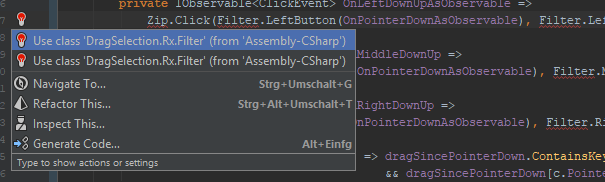
And they show up in the same Assembly (the .csproj are autogenerated by Unity). As this forum only leds me upload jpeg, gif or png, here is the csproj:
Hello E1025890!
It will be very helpful if you could provide solution via 'Submit a request' form.
Thank you.