[1538] Problem with editing non code files

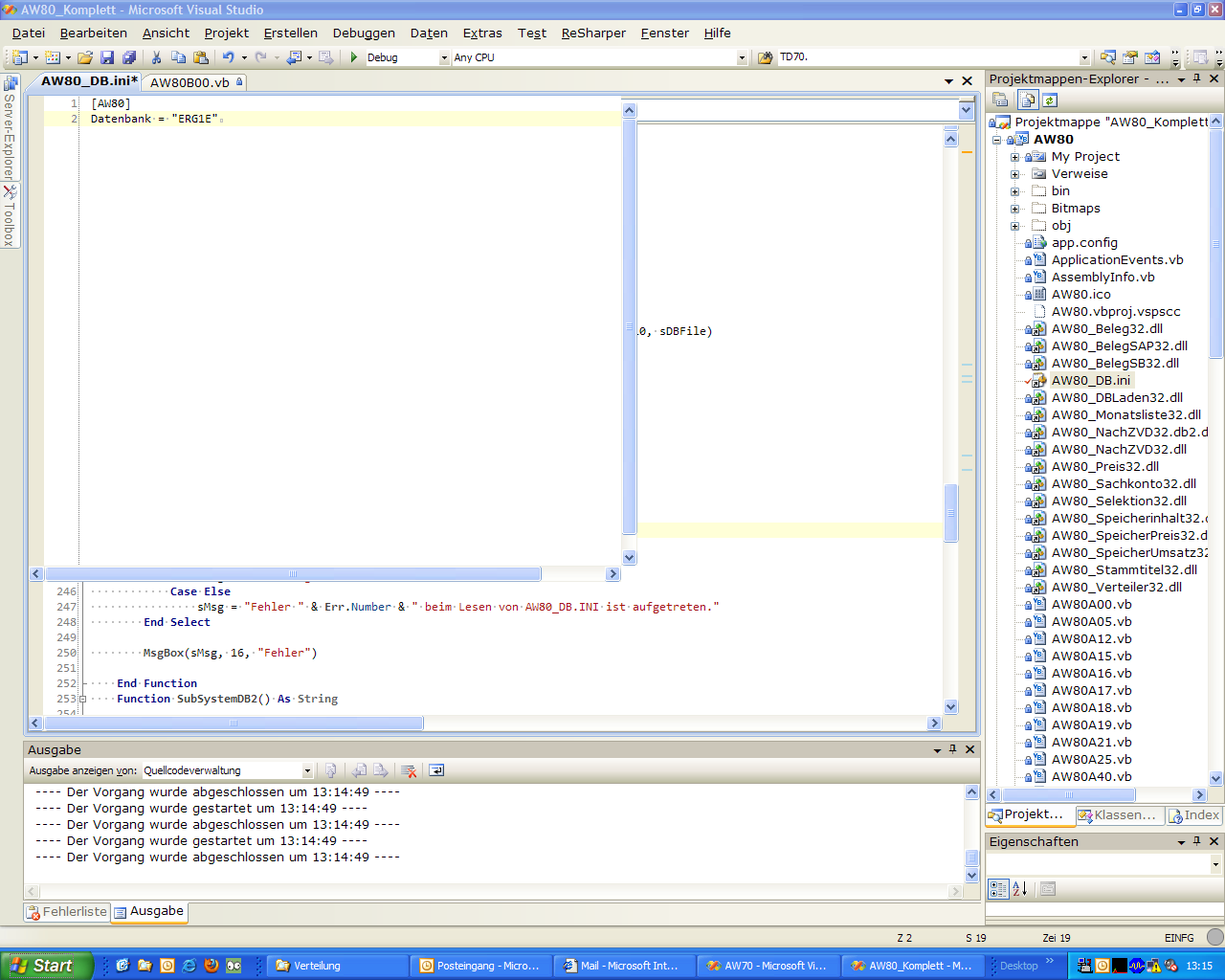
There seems to be a problem with the handling of files which are no vb or c# code. The code editor window doesn't use the available region. I have attached a screenshot which shows the problem.
I'm working with Visual Studio 2008.
Regards
Klaus
Attachment(s):
Screenshot.png
Please sign in to leave a comment.
I can confirm this issue in build 5.0.1538.2.
Also, this site continues to vend different content to the Opera browser, which makes posting comments painful.
Opera works fine if you just send it the damn Firefox version, please fix this.
I have the same issue with similar screenshot - tried with *.sql files
As workaround you can press on Maximize button of Visual Studio - this will properly rerender file
P.S. It is impossible to add posts using Opera browser (I'm using 1893 version) - I prefer this browser too
The same issue occurs on the files of a C++ solution.
Yes, I'm seeing this too.
Another work around is to change the size of the code window slightly by dragging a splitter.
I can confirm that this issue is still present in 1541.29, in particular whilst editing Live Templates.
The actual text seen in the screenshot is not the text of the "ise" live template, but of the test I had open when trying to edit the template
Attachment(s):
non-code-text-editor-not-showing.png