[2148] VB Code Cleanup stays weird

A post from Brian Jones in the community forum directs my attention on code cleanup. The Jetbrains team had announced improvements in VB code formatting for version 6.0. Until now nothing happened to fix the issues making the code formatting results weird. As the release comes up the horizon i want to ask the developer team if they planned some effort for VB Code Cleanup or if it will again be delayed (as in the last two reeleases)?
Regards
Klaus
Please sign in to leave a comment.
Hello Klaus,
I found only one issue regarding code cleanup reported by you which is not
yet resolved: http://youtrack.jetbrains.net/issue/RSRP-99313 and we'll take
a look at it. If there are any other problems that you're observing, could
you please submit them to our issue tracker and tell me the issue numbers,
so that I could assign them to responsible developer and raise their priority.
Thank you!
Andrey Serebryansky
Senior Support Engineer
JetBrains, Inc
http://www.jetbrains.com
"Develop with pleasure!"
Hello Andrey,
at the moment i'm a litlle bit busy. I will post a summary of the problems i have with code cleanup as soon as possible.
Regards
Klaus
Hello Andrey,
i've attached a small solution showing the cleanup problems. There are three forms in the project showing the original input, the result of R#'s code cleanup and what i expected. Additionally i have exported my relevant Visual Studio settings and the "Code Style Sharing" of R# to make it confortable for you to reproduce my problems. The main problem ifor me is that the leading tabs are handled inconsistent. If two developers uses different indentation size the code will be scrambled.
I also recognized that, if you disable the build in "Pretty Listing" of VB language options, R# also handles leading tabs inconsistent (See DummyMethod in Form1_Original.vb).
Another topic i recognized while entering the sample code was the weird intellisense behavior. Try to input the For .. Next loop in DummyMethod by yourself and feel the pain ;).
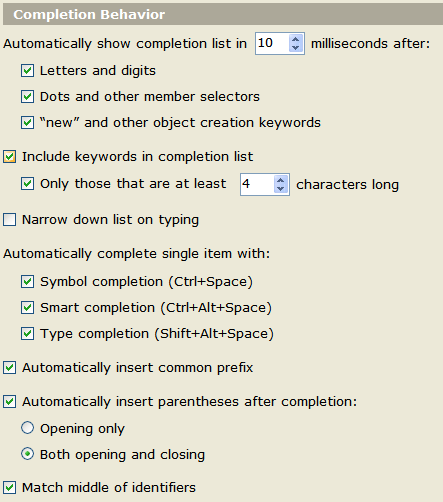
My completion settings are as follows:
Hope that the sample helps you
Klaus
Attachment(s):
CodeCleanup.7z.zip
Hello Klaus,
Thank you for the sample! I've created a bug-report that you can track: http://youtrack.jetbrains.net/issue/RSRP-263188.
As to code completion problems, I've demonstrated them to the corresponding
developer and we will do our best to fix them. Also, I've noticed that you
have 'Include keywords longer than' option set to 4 which prevents the keyword
'To' from appearing in the code completion list. Try reducing this number
to 1, this should help a little.
Andrey Serebryansky
Senior Support Engineer
JetBrains, Inc
http://www.jetbrains.com
"Develop with pleasure!"
Klaus,
I've fixed completion issues in the case when minimal keword length is small so tomorrow's nightly will be way better.
And tomorrow I will addres the problem with short keywords.
Thanks a lot for your feedback.