How do I disable method highlighting?

In my editor I get this kind of enoying highlighting when I hover over the vertical white line you see in the picture. I have to tried to find a way of disabling this but without success. Do you know how I can change this behaviour?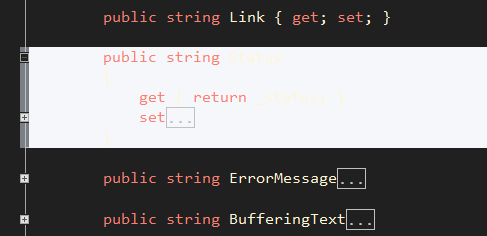
Thanks
Linus
Please sign in to leave a comment.
Hello Linus,
This is actually a Visual Studio built-in feature and I'm not aware of an
option that controls this behavior. As a workaround, you can change the colors
for 'Collapsible region' item under Tools | Options | Environment | Fonts
and Colors, so that they match your normal background and foreground colors.
Thank you!
Andrey Serebryansky
Senior Support Engineer
JetBrains, Inc
http://www.jetbrains.com
"Develop with pleasure!"
Ah, I was quite it was ReSharper :)
Thank you very much.