Am I able to turn error checking off for whole files?

Visual Studio 2010. Resharper 6
I've just installed Resharper 6 and it's giving me a report in the status bar that I've got 3 files with errors.
The 3 files are html files. I manipulate the html in my code and I'm aware that they're incorrect.
I don't really want to see these reported in my status bar, it's confusing. Is it possible to mark them in some way to turn off error checking for them?
Please sign in to leave a comment.
You could go to the ReSharper options - Code Inspection - Inspection Severity - under the HTML tab - and set all the potential code quality issues to "Do Not Show".
That might work.
There is a toolbar button "Ignore Error(s)" that probably does want you want (the window is displayed via menu "ReSharper->Windows->Solution Errors Window").
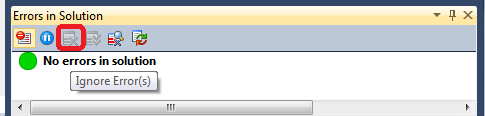
*Edit: Ah sorry you wanted to ignore the file entirely, then this won't work since new errors will show up.
Hello Claire,
Please open ReSharper | Windows | Errors in Solution, right-click each error
and choose 'Ignore Error'. Thank you!
Andrey Serebryansky
Senior Support Engineer
JetBrains, Inc
http://www.jetbrains.com
"Develop with pleasure!"