Cannot resolve symbol...

I've seen a bunch of questions regarding this error, but none of them resolve anything for me.
Stats: VS2010 SP1 (10.0.40219.1), Resharper 5.1.3000.12 (no plugins), using SourceGear Vault 5.1.1 Standard running on Win7 x64.
The solution contains 12 projects and the output is an x86 WinForm exe. The solution compiles perfectly fine.
Fairly often (usually after either a compile or checkin) I get bunch of properties on objects (or objects themselves) highlighted in red saying that it cannot resolve object: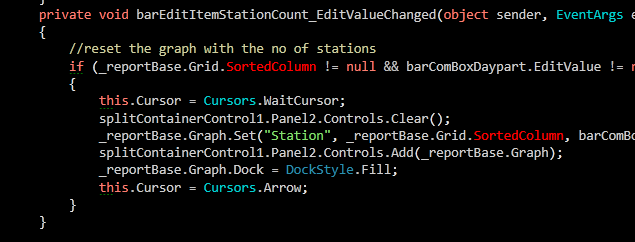
So I click on the "Errors in Solution" indicator and it takes me to this screen:
I go to the first error, try to do "Find Usages" on the ReportDecorator object and, of course, it's grayed out. However, I can get to the object definition using VS' native Go to Definition menu command.
The problem goes away if I either restart Visual Studio or blow away .resharper files, but it always invariably returns.
I have also observed this problem on VS2008.
What am I missing and how do I fix it?
Thanks.
Please sign in to leave a comment.
Hello Frank,
Could you please create a small sample solution that exhibits this behavior
and attach it here? Thank you!
Andrey Serebryansky
Senior Support Engineer
JetBrains, Inc
http://www.jetbrains.com
"Develop with pleasure!"
Andrey,
I never get these errors when the solution is small - thus I can't repro it in a small solution. Isn't there something here I can do to troubleshoot this (logs, screen dumps, etc...)?
I am also open to someone terminaling into my box.
Regards
Hello Frank,
We've fixed a lot of problems that could lead to such errors since ReSharper
5.1.3. Could you please install the latest build of ReSharper 6.1 from http://tinyurl.com/6bdgz6p
and check if this still happens? Thank you!
Andrey Serebryansky
Senior Support Engineer
JetBrains, Inc
http://www.jetbrains.com
"Develop with pleasure!"
I'll give it a shot, though, I'd rather not mess with a working setup.
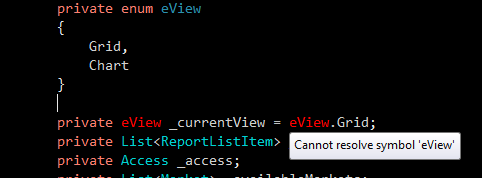
Meanwhile, here is another fun screenshot, where Resharper cannot find a symbol that is right above it:
I upgraded to Resharper 6.0 and the problem went away.