Font Size Trauma

Hey All,
Just installed ReSharper today and have 3 things to report... 1 of 3
follows...
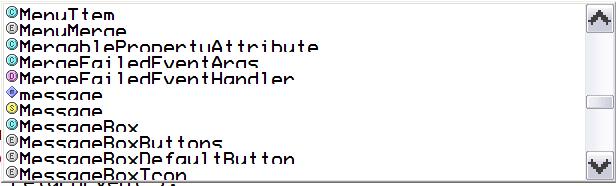
Have a, fairly, hi-res rig (dell inspiron 8500)... 1920x1200. Have increased
both the System Font size (150%/144dpi) and Theme Font Size (Large).
ReSharper, like most applications, can't handle this. Picklists, in
particular, are close to unusable (see attached .jpg).
I'll try system font size normal and Theme Extra Large Font and report back.
Not sure which one (or both) is causing the problem.
Best,
/jhd
Attachment(s):
FontSize.JPG
Please sign in to leave a comment.
Just a test to see if I can in-line the image...
Attachment(s):
FontSize.JPG
Same issue in "Loading Solution" progress at startup... bottom of bar is
outside the window.
/jhd
I tried a couple variations... in all cases font sizes are still a huge
problem due to clipping/overlap.
I tried system fonts normal (100%), and theme font large/extra large. I
tried theme font normal and system fonts 120%. No joy.
/jhd
"John Dhom" <a@b.c> wrote in message news:c3t4fe$7kc$1@is.intellij.net...
>
>
increased
>
back.
>
>
>
>
We plan to fix problems with large fonts in ReSharper UI in M2.
--
Andrey Simanovsky
Software Developer
JetBrains, Inc
http://www.jetbrains.com
"Develop with pleasure!"
"John Dhom" <a@b.c> wrote in message news:c4ug2a$m4b$1@is.intellij.net...
>
>
>
>
>
good deal. thx.
/jhd
"Andrey Simanovsky (JetBrains)" <ands@jetbrains.com> wrote in message
news:c4ums9$et$1@is.intellij.net...
>
>
>
>
news:c3t4fe$7kc$1@is.intellij.net...
>
>