As soon as I typed 's' I got two tooltips plus VS's Intellisense. This might be useful for beginners but for someone who's been doing html & css for years, the tooltips serve me no purpose other than being intrusive.
There are two tooltips: one - parameter information for the current tag and the other one - for the currently selected item in code completion pop-up. You can disable the latter by turning off 'Show summary' option under ReSharper | Options | IntelliSense | Completion Appearance. Thank you!
Andrey Serebryansky Senior Support Engineer JetBrains, Inc http://www.jetbrains.com "Develop with pleasure!"
I don't know why the image got fuzzy. It's clear when in html mode.

Hello abdu,
Could you please attach a screenshot demonstrating this problem? Thank you!
Andrey Serebryansky
Senior Support Engineer
JetBrains, Inc
http://www.jetbrains.com
"Develop with pleasure!"
As soon as I typed 's' I got two tooltips plus VS's Intellisense. This might be useful for beginners but for someone who's been doing html & css for years, the tooltips serve me no purpose other than being intrusive.
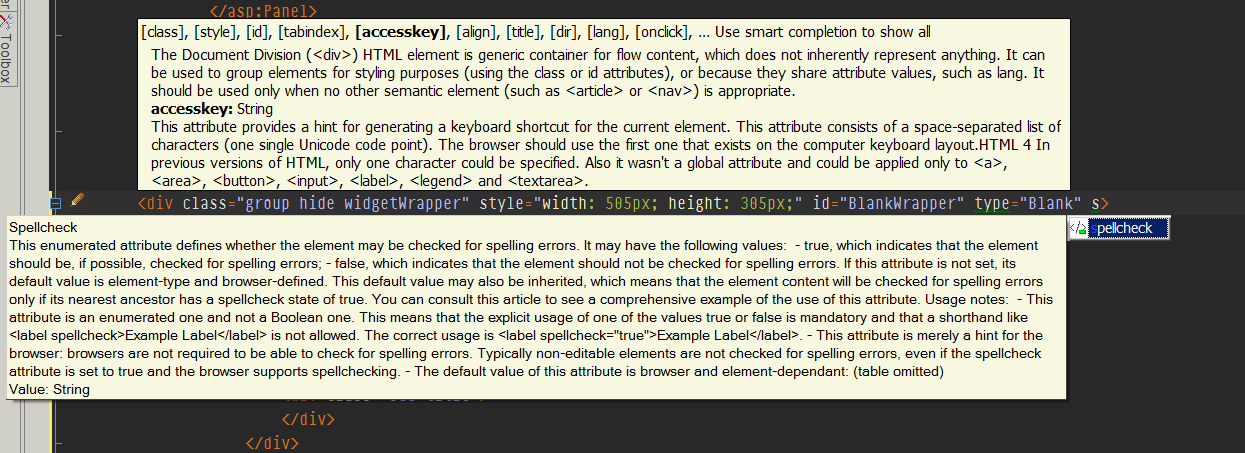
I don't know why the image got fuzzy. It's clear when in html mode.
Hello abdu,
There are two tooltips: one - parameter information for the current tag and
the other one - for the currently selected item in code completion pop-up.
You can disable the latter by turning off 'Show summary' option under ReSharper
| Options | IntelliSense | Completion Appearance. Thank you!
Andrey Serebryansky
Senior Support Engineer
JetBrains, Inc
http://www.jetbrains.com
"Develop with pleasure!"