inconsistent name warning for designer created event methods in resharper 5.1

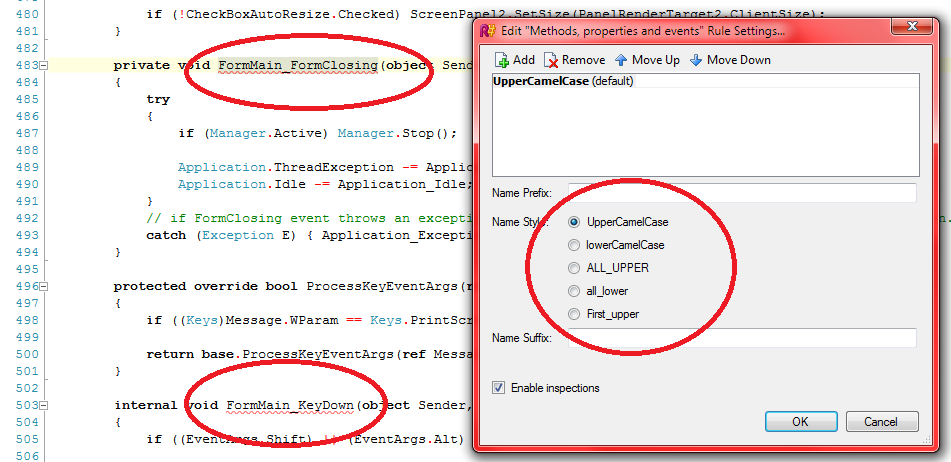
when I was using resharper 5.0, it was not showing an error (or warning depending on user option) for designer created evet methods as they have inconsistent naming since they are like Button1_Click. But it started to be so with the 5.1 and I dont like it :(
yes I know there are no name style like "Upper_Case" in naming options but still 5.0 was not warning me.
am I only one who dont like to see a warning or error for designer created methods ?
my project had zero naming error with 5.0 and it has many many of them with 5.1 now :(
what should I do ?
Attachment(s):
event names.png
Please sign in to leave a comment.
Hello Onur,
Could you please attach a small sample solution demonstrating the case where
ReSharper 5.1 issues a warning on an event handler? Thanky you!
Andrey Serebryansky
Support Engineer
JetBrains, Inc
http://www.jetbrains.com
"Develop with pleasure!"
I already had attached a screenshot before but ok.. I will add a new screen shot and a solution now.
the solution is a new windowforms project. I have double clicked the form and the designer has created the Load event handler. then I just typed Text = "";
you can see the error in the screenshot.
Attachment(s):
2.png
WindowsFormsApplication4.rar.zip
I think the rule that it uses for event handler names may have changed.
This is how I fixed it for us - maybe this will work for you:
(1) Go to Resharper | Options
(2) Go to Languages | Common | Naming Style and click the "Advanced Settings" button.
(3) Look at the "Event subscriptions on fields" thing.
For me it was saying $object$_On$event$, which doesn't match what the designer puts in.
I changed it to $object$_$event$ and it fixed things for me.
ty very much :)