How do I stop resharper auto-formatting c# code using spaces?

when I type the semicolon or closing brace on a multi line statement resharper auto-formats the line using spaces, not tabs. Is there a way to force it to use tabs or do I just have to switch auto-formatting off?
Please sign in to leave a comment.
hi anthony,
in my knowledge R# don't have an option for using sapces or tabs for indenting. If you are working with
VB with "pretty listing" option set, R# will not reformat the code, it's done by the VS editor. VB uses
spaces for indenting by default.
How are your tab settings in the Visual Studio options (Tools/Options->Text-Editor->(All Languages/C#/VB)->Tabs)?
This option screen gives you control about how to indent code.
Regards
Klaus
On 07.04.2010 18:42, anthony brown wrote:
>
Hey Guys!
I've got the same problem. I'm using tabs on my project and I've got in Tools->Options->Text Editor->All Languages->Tabs 'Keep tabs' radio checked. We also have StyleCop checking for style errors (where one of the rules is to NOT keep spaces). But each time I use object initializer with properties on separate lines after pushing enter auto formatting inserts spaces instead of tabs.
Example:
1. We have the following code:
User u = new User();
u.Id = 1;
u.Login = "Test";
2. Select 'Use object initilizer' from resharper menu. Code turns to the following:
User u = new User{Id = 1, Login = "Test"};
3. Put cursor before Id and press Enter to make initialization multiline.
Result: Three lines are moved to the right using spaces:
User u = new User
{
Id = 1, Login = "Test"
};
Is it possible to somehow fix this problem?
TIA,
Anatoly Kotlyar
Hello Anatoly,
Which version of ReSharper are you using? I wasn't able to reproduce this
behavior with ReSharper 5.1. Thank you!
Andrey Serebryansky
Support Engineer
JetBrains, Inc
http://www.jetbrains.com
"Develop with pleasure!"
My one is 5.1.1727.12. But this was the case even on previous versions. (BTW my tab size is 4).
I met with a similar problem.
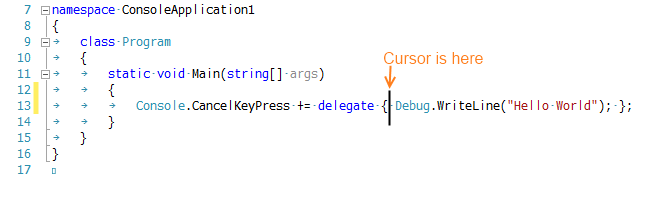
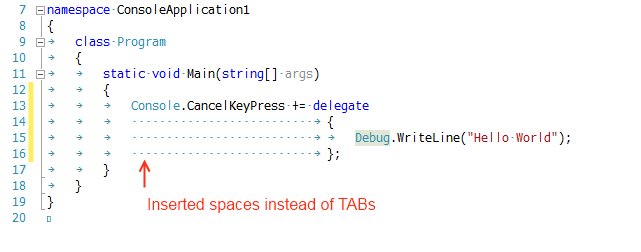
Visual Studio 2010 and Resharper 5.1
then ENTER pressed
Why?
Visual Studio setting:
Tab: 4
Indent: 4
Keep tabs: true
Please fix this issue.
Hello Kengo,
There's a similar bug-report in our tracker: http://youtrack.jetbrains.net/issue/RSRP-150306
and you're welcome to vote for it. Thank you!
Andrey Serebryansky
Senior Support Engineer
JetBrains, Inc
http://www.jetbrains.com
"Develop with pleasure!"
Thank you for your help!
I vote it!