Big Solution Split

Hello!
We have a big solution with many projects inside one Solution, the problem is that it hard to work with such big solution,
in some project we have big files around 50-70 KB with about 1500 lines of code, and when you try to edit this files it's very slow.
So I tried to split the big solution in smaller solutions what is partially working.
In attach you can find a sample of how I want to do the splitting
Actually the structure in sample is simple
- BigSolution.sln "something like a big project"
- ClassLibrary1\ClassLibrary1.csproj
- ClassLibrary2\ClassLibrary2.csproj
- ClassLibrary3\ClassLibrary3.csproj
- SmallSolution1.sln "just some projects from BigSolution"
- ClassLibrary2\ClassLibrary2.csproj
- SmallSolution2.sln "just some projects from BigSolution"
- ClassLibrary1\ClassLibrary1.csproj
- ClassLibrary3\ClassLibrary3.csproj
The problem appears on building the small solutions, as a first build I have to build the BigSolution so that all binaries are created then I open small solutions
and if Resharper is swiched OFF I have no problems, Visual Studio somehow finds the corresponding references, and Visual Studio intellisence and build works fine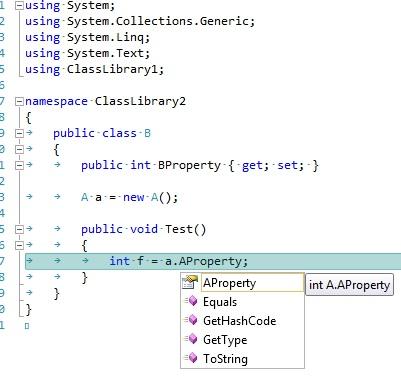
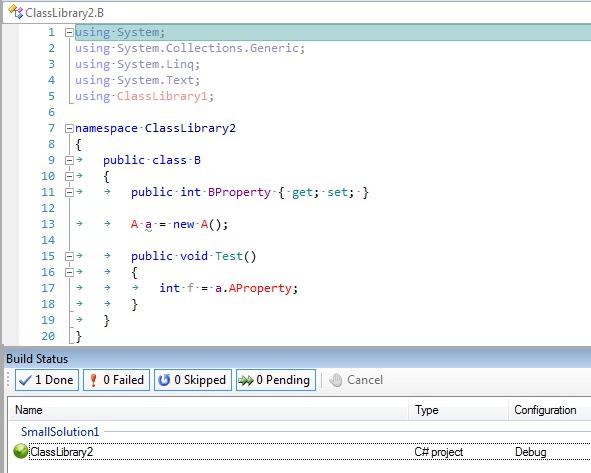
And if I switch Resharper ON then in small solutions no references to projects are not found, and intellisence is not working 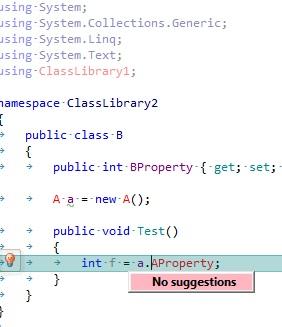
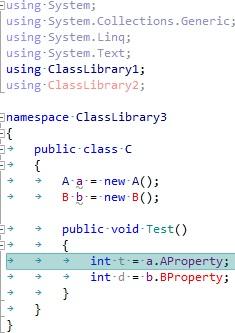
Now if I change the SmallSolution1.sln and SmallSolution2.sln to have only one build configuration something like "External", remove the Debug and Release configuration,
and also update all csproj to have the External as a copy of Debug.
Changing in all csproj by adding External build property and change the ProjectReferences with something like:
<ItemGroup Condition="'$(Configuration)' == 'External'">
<Reference Include="ClassLibrary1">
<HintPath>..\ClassLibrary1\bin\Debug\ClassLibrary1.dll</HintPath>
</Reference>>
<ItemGroup Condition="'$(Configuration)' != 'External'">
<ProjectReference Include="..\ClassLibrary1\ClassLibrary1.csproj">
<Project>{097F960A-BEFB-44F8-BA33-AB69599A5603}</Project>
<Name>ClassLibrary1</Name>
</ProjectReference>
</ItemGroup>
In this case when it Resharper works fine, but the big solution in Visual Studio seems to ignore the Condition and it's referecing only dll, however in big solution I have don't have at all External as a build configuration, so it should work ProjectReference and not Reference.
So is there any way to get around this, not to have the <ItemGroup Condition="'$(Configuration)' == 'External'"> but to keep the reference as a normal project so that Resharper intellisence also would work?
Attachment(s):
BigSolution.zip
Please sign in to leave a comment.
Hello Andrian,
I've created a task for our QA engineer: http://youtrack.jetbrains.net/issue/RSRP-197246
and we will try reproducing this problem on our side. You're welcome to monitor
the status of the task. Thank you!
Andrey Serebryansky
Senior Support Engineer
JetBrains, Inc
http://www.jetbrains.com
"Develop with pleasure!"
Hi Andrian!
Unfortunately I couldn't reproduce this behavior on my side. I have also tried to change .sln and csproj files but without luck. Could you please attach your version of these files with necessary modifications.
Thanks in advance!
HI Kirill,
I think I know why you couldn't reporoduced it.
In solution what I attached previous the in csproj files are referencing both dll and projects from other solutions, now I'll attach a zip file with 2 folders inside.
Please look at the difference of sln and csproj files from this 2 folders.
I'll try to explain the difference based on ClassLibrary3 which is referencing ClassLibrary1 and ClassLibrary2.
In first folder the reference is like bellow, and with this combination I assume that Visual Studio or Resharper is only reacting on dll reference and not on project reference:
<ItemGroup Condition="'$(Configuration)' == 'External'">
<Reference Include="ClassLibrary1">
<HintPath>..\ClassLibrary1\bin\Debug\ClassLibrary1.dll</HintPath>
</Reference>
<Reference Include="ClassLibrary2">
<HintPath>..\ClassLibrary2\bin\Debug\ClassLibrary2.dll</HintPath>
</Reference>
</ItemGroup>
<ItemGroup Condition="'$(Configuration)' != 'External'">
<ProjectReference Include="..\ClassLibrary1\ClassLibrary1.csproj">
<Project>{097F960A-BEFB-44F8-BA33-AB69599A5603}</Project>
<Name>ClassLibrary1</Name>
</ProjectReference>
<ProjectReference Include="..\ClassLibrary2\ClassLibrary2.csproj">
<Project>{26D6A325-DDFE-4D5A-90C8-1F3FEA8F95CF}</Project>
<Name>ClassLibrary2</Name>
</ProjectReference>
</ItemGroup>
And is second where Resharper is failing, there is a normal project reference and if you disable Resharper then Visual Studio is working fine:
<ItemGroup>
<ProjectReference Include="..\ClassLibrary1\ClassLibrary1.csproj">
<Project>{097F960A-BEFB-44F8-BA33-AB69599A5603}</Project>
<Name>ClassLibrary1</Name>
</ProjectReference>
<ProjectReference Include="..\ClassLibrary2\ClassLibrary2.csproj">
<Project>{26D6A325-DDFE-4D5A-90C8-1F3FEA8F95CF}</Project>
<Name>ClassLibrary2</Name>
</ProjectReference>
</ItemGroup>
It would be there good to have this functionality without any tricks like in first folder.
Attachment(s):
Solutions.zip
Great! I could be able to reproduce this. Thanks with the sample. We will try to fix it ASAP, but I can't promise you that we'll fix this in 5.1.x version.
You are welcome to monitor its status at http://youtrack.jetbrains.net/issue/RSRP-197246
Thank you!