Unit Test Runner failed to load test assembly: Object reference not set..

We are using R# 4.5 and trying to migrate to R# 5. After installing latest version (JetBrains ReSharper 5.1 C# Edition Build 5.1.1766.4 on 2011-01-12T16:31:10) we obtain same error message during running unit tests. Every test in our solution is failed, even simplest one:
using NUnit.Framework;
namespace Paceart.Customization.Tests.Domain.Encounters
{
[TestFixture]
public class SampleTest
{
[Test]
public void Test()
{
Assert.IsTrue(true);
}
}
}
That doesn't depends on environment that we use (Win 7 x64, Visual Studio 2008; Win XP). The message is given bellow (JetBrains.Resharper.TaskRunnerFramework.TaskException: Object reference not set to an instance of an object):

I'm tried to change nUnit Runner in reshrper options, tried to disable option "Shadow-copy assemblies being tested" but that doesn't help. With R# 4.5 it's all right.
What I missed or what should I do with this issue?
Please sign in to leave a comment.
ReSharper 5.1 bundles NUnit 2.5.7, please make sure that you reference nunit.framework.dll version at least 2.5. There are some known problems when referencing older framework versions.
Hi,
Could you please try to install the latest R# 5.1.3 release?
--
Kirill Falk
JetBrains, Inc
http://www.jetbrains.com
"Develop with pleasure!"
I try to use both variant: included in Resharper 5.1 nUnit 2.5.7 and external version nUnit 2.5.9. That doesn't help, in any cases we have error message.
How can I provide to you some additional information about this issue? We want very much to use the new version, but that error doesn't give us such possibility.
Please, create a small sample solution which reproduces this problem.
Also, please run devenv.exe /ReSharper.LogFile c:\path\to\logfile.log try to run your tests and share log file.
This 2 things could help us a lot.
I'm downloaded and installed latest R# 5.1.3, but it's didn't help. :_|
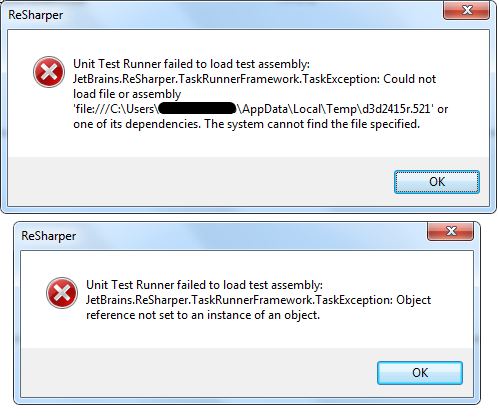
Still same error (pic. message 2). When I'm switch to custom nUnit mode and select nUnit 2.5.9 i receive another error with same result - tests didn't run (pic. message 1) ?:|.
I am also having the same issue.
I am running Win7 x64 with vs2008.
I have two build configurations: one is x86 and the other x64.
Now i can run unit tests using nUnit fine from within vs on x64bit build configuration given the fact that i will uncheck shadow-copy option. However if I switch to x86 build configuration I recieve an exception on dll's that were compiled as x86 and dll's that were compiled as Any CPU are ok.
I also downloaded nUnit 2.5.9 and when i right click on dll and choosing an option to run tests - the dll's that are fail to run from within vs fail also to run from nUnit. However if I go and substitute 64bit nunit.exe with 32bit nunit.exe and try to run tests for a given dll - everything works fine.
This brings me to the question whether ReSharper is smart enough based on build configuration to choose proper nUnit to run?
If asnwer is yes - then how can i set it up since by default it seems ReSharper is trying to run 64bit nUnit on 32bit dll
Thanks in advance,
Aleksey
ReSharper 5.1 doesn't support NUnit 2.5.9, sorry. Try ReSharper 6 EAP builds that come with NUnit 2.5.9 bundled.
Test Runner chooses framework version and platform based on assembly with tests. It runs exactly the same runner version as test assembly.