Control Prefix Intellisense Fail

Using VS2010 w/ ReSharper 6.0 C# Edition Build 6.0.2202.68
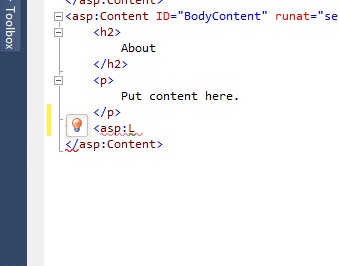
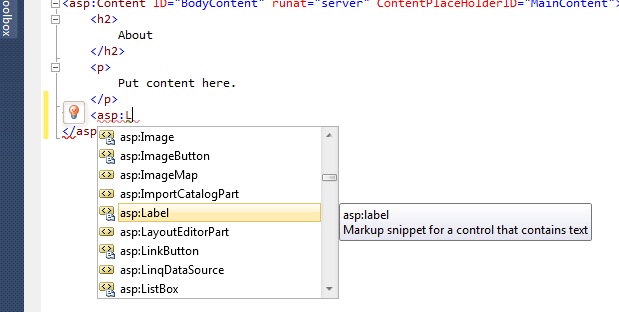
I've noticed that at some point in time my Intellisense on .aspx pages for control prefixes has ceased to work properly. This includes any custom controls as well as the regular asp: prefixed controls.
If I go into RS options and turn the Intellisense from RS back to VS, it works, but when it is set to RS, it does not work.
Attached two files showing the two scenarios.
I've tried blowing out the RS files within my solution folders. I've also tried brand new projects, both Website and Web Application. I've tried going into my docs / AppData / Roaming / Microsoft / VisualStudio and blowing out the 10.0 folder so it rebuilds everything. Nothing seems to help. I did not muck with the RS options out of the box (at least I don't remember doing so), and I've looked through them and do not see anything obvious.
Is there an option somewhere inside RS that's causing it to misbehave when it's handling the Intellisense?
Attachment(s):
IS-Resharper.jpg
IS-VisualStudio.jpg
Please sign in to leave a comment.
Hello,
Do I understand correctly that ReSharper IntelliSense doesn't work in this
case for any web site or web application? Could you please run Visual Studio
(devenv.exe) with /ReSharper.LogFile "C:\log.txt" /ReSharper.LogLevel Verbose
command line parameters, make sure ReSharper's IntelliSense doesn't work
and attach the resulting log file here? Thank you!
Andrey Serebryansky
Senior Support Engineer
JetBrains, Inc
http://www.jetbrains.com
"Develop with pleasure!"
Log file attached. If it matters, I did the following:
1. Ran your command.
2. After VS opened, I created a new web application project.
3. I added a new .aspx page to the project.
4. I attempted to invoke the Intellisense for an asp: control. It failed to do anything.
5. I went into RS Options and changed IntelliSense from RS to VS
6. I attempted to invoke the Intellisense for an asp: control. It worked.
7. I changed the option back.
8. I closed VS.
Here's that log.
Attachment(s):
log.txt.zip
Hello,
Actually, I do not see anything suspicious in the log. Could you please install
the latest build of ReSharper 6.1 from http://tinyurl.com/6bdgz6p and check
if IntelliSense work better in that build? Thank you!
Andrey Serebryansky
Senior Support Engineer
JetBrains, Inc
http://www.jetbrains.com
"Develop with pleasure!"
Okay. I'm going to uninstall RS first. I used to have version 5 on here and I upgraded to 6. Maybe something in the upgrade process screwed up.
I'll uninstall 6 completely and then install 6.1 from your link and let you know how it goes.
I'm not sure if it was the uninstall/reinstall process, or 6.1 itself, but with the Nov 15 build of 6.1 Intellisense is working again.
Should I stay on this build or should I uninstall and go back to 6.0 ?
Hello,
You can keep this build if it works for you. You can also upgrade to a newer
build from the same page. Thank you!
Andrey Serebryansky
Senior Support Engineer
JetBrains, Inc
http://www.jetbrains.com
"Develop with pleasure!"