Please try the following steps: 1. Open %LocalAppData%\JetBrains\Installations\ folder; 2. Remove all the subfolders which names start with ReSharperPlatformVs; 3. Open "Programs and Features" applet of Windows Control Panel; 4. Click uninstall for the ReSharper Ultimate record; 5. Windows will notify you that there is no uninstaller and will suggest removing the record.
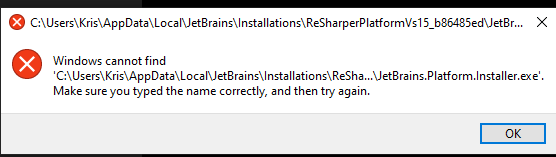
Kris: I got the same error as you in the Apps & Features applet in Windows 10, but if you actually go to Programs and Features (via the Control Panel), it worked for me as described above.


Hello!
Please try the following steps:
1. Open %LocalAppData%\JetBrains\Installations\ folder;
2. Remove all the subfolders which names start with ReSharperPlatformVs;
3. Open "Programs and Features" applet of Windows Control Panel;
4. Click uninstall for the ReSharper Ultimate record;
5. Windows will notify you that there is no uninstaller and will suggest removing the record.
Thank you.
This did not work for me. I got the following error message after removing the folders and trying to uninstall:
Hello Kris,
Thank you for the feedback.
Could you please specify if you tried uninstalling from Programs and Features applet?
Thank you.
Kris: I got the same error as you in the Apps & Features applet in Windows 10, but if you actually go to Programs and Features (via the Control Panel), it worked for me as described above.