how to disable "unnecessary region" inspection

I just noticed that there is a inspection on the #region directive:
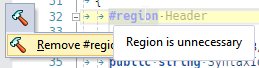
I didn' find any option to disable this. I have tried to disable the editorconfig, clang and stylecop support and can't find an entry in the "Inspection Severity" options. There is also no entry in theVGisual Studio code style options. Is there any place i missed?
Please sign in to leave a comment.
Hello Andreas!
Thank you for contacting us.
Please try disabling context action "Remove #region #endregion directives" in ReSharper | Option | Code Editing | Context Actions.
Thank you.
Thanks for the hint. I didn't considered that there are also context actions. But disabling the action has no effect. I tried to close and reopen the editor view, restarted Visual Studio and cleared the R# cache.
I'm using Visual Studio Enterprise 2017 Version 15.8.4 and R# 2018.2.3. Actually i'm working on a .NET Core 2.1 console application, but i created projects of other types an reproduced the behaviour.
Hello Andreas!
Thank you for the reply.
Could you please share your VS info (Help | About MS VS | Copy Info) and ReSharper settings (https://www.jetbrains.com/help/resharper/Sharing_Configuration_Options.html#managing).
You can share them privately via 'Submit a request' form.
Thank you.
Hello Angelina,
i have provided the rquested information via "submit request".
Thanks in advance
Andreas