property auto create from template

Hy,
I have an XAML with this line:
If I use ReSharper for auto generating the necessary property, I get the following code:

There is a way to get the following code ?:
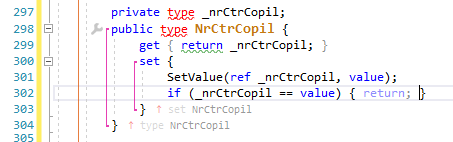
Thank you.
Please sign in to leave a comment.
Hello Adrian!
Thank you for contacting us.
ReSharper doesn't provide such option. You could write a custom plugin to do this. It would need to be a Custom Action that would recognize an auto-property, and when invoked, would create a new field, and a new property with the given getter and setter. You can find more details about writing a plugin in the developer's guide.
Has anything changed 6 years later? Can I somehow edit the code that is generated the way that Adrian was asking?
Hello Lucasz,
you could do it this way:
1. Set the following option in ReSharper settings:
2. Invoke quick-fix "Create property";
3. Add a setter via context action “Add ‘set’ accessor”;
4. And now on a property it is possible to call context action “To property with 'XXX' change notification”, where XXX is a method name ( 'SetValue' in a sample above).
Thank you!
Yes, I do that, but when I have a DataGrid and 10 columns, I have to do that 10 times and it's tedious, about 8 clicks instead of 2.
at this moment we don't have any other way to do it.
You are welcome to create a feature request in YouTrack: https://youtrack.jetbrains.com/issues/RSRP
Thank you!