cleanupcode.exe applies javascript rules to C# files

I'm trying to run cleanupcode.exe against a .NET project and it's applying javascript cleanup to the C# files. I've reproduced the issue in another solution, both with and without a custom .DotSettings file. When I use code cleanup via visual studio everything works as expected.
I'm using JetBrains Cleanup Code 2018.1.4 (installed via chocolaty)
I tried looking for command line options that might specify the language but couldn't find anything.
Does anyone know what I'm doing wrong?
Edit:
It may not be javascript rules after all. The issue is it switches all my indentations to 2 spaces. I assumed (given the console output) this was JS rules but after looking in VS at the JS definition it also seems to define indentation as 4 spaces.
Edit:
I found the issue. The settings in VS included an option to use VS indentation rules. When I disabled that it added the following line to my DotSettings and the CLI started working as expected.
<s:Boolean x:Key="/Default/CodeStyle/CodeFormatting/CSharpFormat/USE_INDENT_FROM_VS/@EntryValue">False</s:Boolean>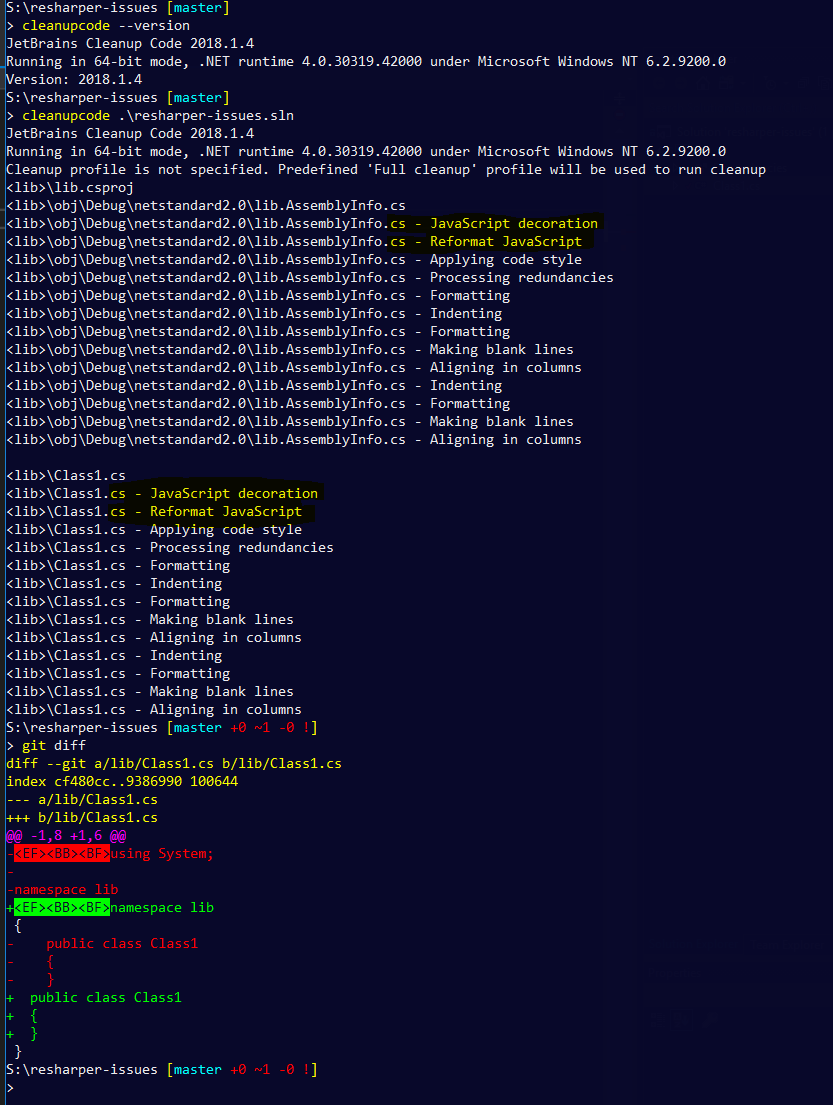
Please sign in to leave a comment.