Smart indent wrongly indents

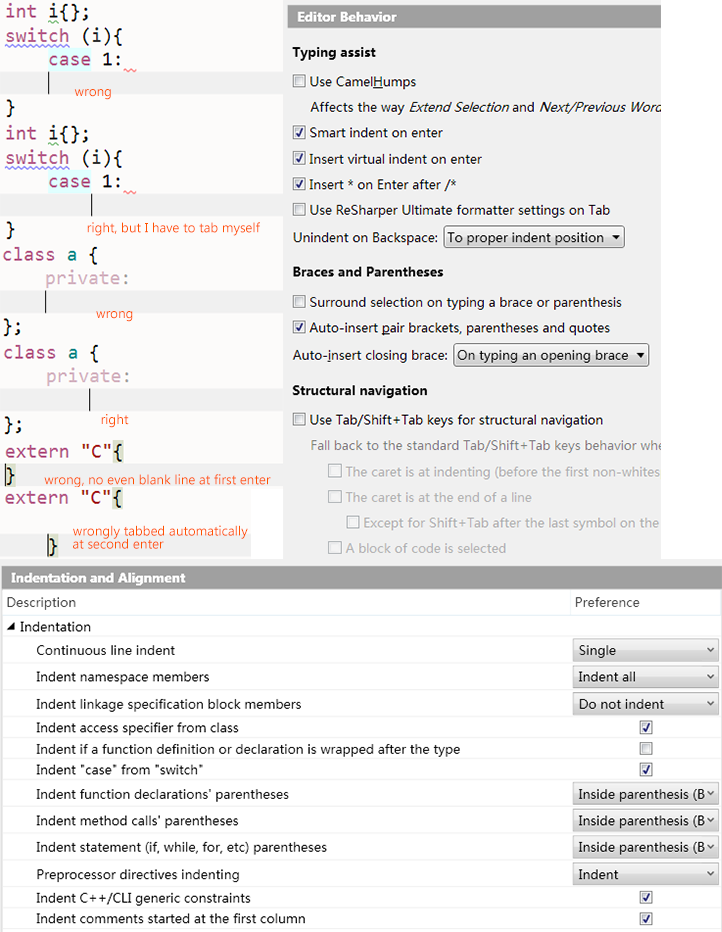
Using VS2010, ReSharper 2019.1, but the things appears to be the same on higher versions. As is shown in the picture below, the indentation is wrong in many cases, while I can't find a way to modify this. Am I missing out something? Please help.
Please sign in to leave a comment.
Hello,
You need to configure formatting settings:
As is shown in the picture I've turned on Indent 'case' from ‘switch’, but the following lines are still not automatically indented. If i type braces like case 1:{} it can indent normally, but this is annoying as I do need to deal with case without braces often. I'd suggest you add this. Thanks.
I don't see this issue in 2026.1, try updating your R#.
Maybe it will work, but it's impossible to install newer versions on vs2010 anymore.
Which is said in the blog https://blog.jetbrains.com/dotnet/2023/02/10/ending-development-for-vs-2010-2012. However I tried to download R# 2026 and 2026 but they keep me from installing and show unsupported version vs2010. I'm sorry to find that ReSharper seems to have totally ended support for this classic version of vs. If there's a way to install it in experiment mode or so, please tell me.
Probably no way to install the latest R# into VS2010. Seems like the most recent R# version that supports VS2010 is 2022.3, you probably should at least update to it.
since 2019.3, including 2022.3, I've been encountering failures of resolving symbols. As is shown in the picture below, it wrongly highlights many kinds of symbols in the file, including WC_BUTTONW, HRESULT and so. This isn't happening in my 2019.1 and lower, and the program compiles succesfully.
i'm trying to post a picture but it seems not displaying