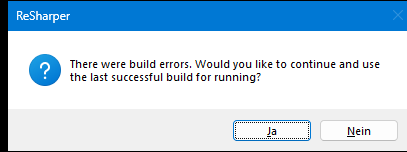
ReSharper build error dialog

Hello,
how can I disable the dialog which appears if the was a build error which suggest to run the last successful build? I never want to run the last successful build…
Thanks,
Michael
Please sign in to leave a comment.
Is it connected to the VS setting?
Options → Projects and Solutions → Build and Run → On run, when build or deployment errors occur
Sounds like you have it set to “prompt to launch” instead of “never launch”.
Richard Deeming, thank you so much for your help!
Michael Sontheimer, I can confirm that setting “On run, when build or deployment errors occur” option in Visual Studio settings to the “Do not Launch” value helps prevent the dialog from appearing. Hope it helps. Thank you!
Hello,
The option in Visual Studio is set to “Never start,” which is what's strange about it...
As you can see, the dialog is not from Visual Studio, it is from ReSharper.
When turning off “Use ReSharper Build” in the ReSharper options, no dialog appears as expected...
Michael
Michael Sontheimer, thank you for your reply. Just to make sure I understand correctly - this window keeps appearing when you run the application, but not when you build it, right?
Hello,
It appears when pressing F5 (Build & Run) and if there is an error in the code.
VS tries to compile it, fails and then this dialog appears, but only if “ReSharper” build is enabled in the ReSharper settings.
Michael
Muchael, thanks for the details provided. I’ve created the following issue about this behavior: RSRP-502351 ReSharper Build: it's impossible to disable "Would you like to use the latest successful build" when pressing F5. Unfortunately, I haven’t been able to find any workaround. Please vote for it to stay updated on any status changes. Thank you!