Visual Studio 2026 - Installed 25.2.1 - but not in the Extension Manager

As the title says, I installed 25.2.1, you can see in the screenshot below, that I have 18 selected after reopening the installer and you can see it's installed.

When I go into the Extension manager and search for installed: Resharper. Nothing shows up

And it doesn't exist under the Extensions menu item

I do a feature search
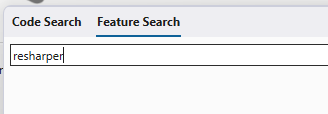
Nothing.
Here is a copy of the Visual Studio Help Info
Visual C++ 2026 00487-20000-00000-AA478
Microsoft Visual C++ 2026
.NET MAUI Tools 18.0.287 (1606cb77e5)
Visual Studio extension to enable .NET MAUI development.
.NET MAUI UI Tools 18.0.1.28 (remotes/origin/main@6dedd11067)
Visual Studio extension to enable .NET MAUI UI tools.
ADL Tools Service Provider 1.0
This package contains services used by Data Lake tools
ASA Service Provider 1.0
ASP.NET and Web Tools 18.0.267.38081
ASP.NET and Web Tools
Azure App Service Tools v3.0.0 18.0.267.38081
Azure App Service Tools v3.0.0
Azure Data Lake Tools for Visual Studio 2.6.5000.0
Microsoft Azure Data Lake Tools for Visual Studio
Azure Functions and Web Jobs Tools 18.0.267.38081
Azure Functions and Web Jobs Tools
Azure Stream Analytics Tools for Visual Studio 2.6.5000.0
Microsoft Azure Stream Analytics Tools for Visual Studio
C# Tools 5.0.0-2.25459.9+5d47bb1c178652caa40b55664c06c74e35edebdf
C# components used in the IDE. Depending on your project type and settings, a different version of the compiler may be used.
GitHub Copilot 18.0.636.43670
GitHub Copilot is an AI pair programmer that helps you write code faster and with less work.
Microsoft Azure Hive Query Language Service 2.6.5000.0
Language service for Hive query
Microsoft Azure Stream Analytics Language Service 2.6.5000.0
Language service for Azure Stream Analytics
Mono Debugging for Visual Studio 18.0.15 (76f6142551)
Support for debugging Mono processes with Visual Studio
Node.js Tools 1.5.70729.1 Commit Hash:7e362c1cf2c48c547a94b4eee7f276acca547563
Adds support for developing and debugging Node.js apps in Visual Studio
NuGet Package Manager 7.0.0
NuGet Package Manager in Visual Studio. For more information about NuGet, visit https://docs.nuget.org/
Office Developer Tools for Visual Studio 18.0.36329.00
Microsoft Office Developer Tools for Visual Studio
Razor (ASP.NET Core) 17.15.2.2542001+8e78af3e00c3286054802a9c71dd85f962d55af1
Provides languages services for ASP.NET Core Razor.
SQL Server Data Tools 18.0.74.0
Microsoft SQL Server Data Tools
Test Adapter for Boost.Test 1.0
Enables Visual Studio's testing tools with unit tests written for Boost.Test. The use terms and Third Party Notices are available in the extension installation directory.
Test Adapter for Google Test 1.0
Enables Visual Studio's testing tools with unit tests written for Google Test. The use terms and Third Party Notices are available in the extension installation directory.
ToolWindowHostedEditor 1.0
Hosting json editor into a tool window
TypeScript Tools 18.0.0820.2001
TypeScript Tools for Microsoft Visual Studio
Visual Basic Tools 5.0.0-2.25459.9+5d47bb1c178652caa40b55664c06c74e35edebdf
Visual Basic components used in the IDE. Depending on your project type and settings, a different version of the compiler may be used.
Visual F# Tools 18.0.0-preview7.25414.7+616530c723b1017697f4b85a3f76432c3b6881e4
Microsoft Visual F# Tools
Visual Studio IntelliCode 2.2.3137.62477
AI-assisted development for Visual Studio.
VSPackage Extension 1.0
VSPackage Visual Studio Extension Detailed Info
WiX Toolset Visual Studio Extension 1.0.0.22
WiX Toolset Visual Studio Extension version 1.0.0.22
Copyright (c) .NET Foundation and contributors. All rights reserved.
Workflow Manager Tools 1.0 1.0
This package contains the necessary Visual Studio integration components for Workflow Manager.
Please sign in to leave a comment.
I too have experienced this. I cannot get ReSharper to work with Studio 2026 Insiders
Hi Greg, Joe,
Thank you for the feedback.
Could you please attach installation log files from
%LocalAppData%\JetBrains\Shared\vAny\Installer? They can be uploaded using our upload service, just let me know Upload Id.Upload id: 2025_09_17_2AQWa6YcnCxX1dr9YoQ6fa (files: InstallLog_2025-09-04T08-54-28.txt and 14 more)
Upload id: 2025_09_17_GHVcto4B6LYE2bw6RS3u88 (file: InstallLog_2025-09-11T14-16-30_18.0_03439ccc.zip)
I've posted the same issue over on the Dev Community site as well: https://developercommunity.visualstudio.com/t/Resharper-Extension-not-loading-unless-y/10966907?port=1025&fsid=33649454-a614-45b8-a1a1-96ef5d6a0ef1&ref=native&refTime=1758113628869&refUserId=aebd504e-e4a3-6b0f-a7e2-6270f0d4ea59
As a side note, I installed DevExpress 25.x as well, and it too is doing the same thing.
https://developercommunity.visualstudio.com/t/Devexpress-Extension-not-under-extension/10967490?port=1025&fsid=33649454-a614-45b8-a1a1-96ef5d6a0ef1&ref=native&refTime=1758113669948&refUserId=aebd504e-e4a3-6b0f-a7e2-6270f0d4ea59
Thank you Joe Clack.
Currently, we cannot say why installer suggest repairing instead of installing in this case. Filed an issue for further investigation - RSRP-501755 Installer allows only to repair ReSharper installation in VS18 as if it's already installed.
Could you please check if installer works if you run it with the command:
Thank you Greg Bartlett.
As far as I see from the log and from the Dev community issue, ReSharper is installed in your case but doesn't appear in VS?
Could you please collect all logs from
%temp%\JetLogsand also upload them to our upload service?Hi Angelina, I also have a ticket open with Microsoft where I assume they engaged your alls team as well. I don't know how you'd like to handle this, but here's the link to that ticket
https://developercommunity.visualstudio.com/t/Resharper-Extension-not-loading-unless-y/10966907#T-ND10968333
Greg Bartlett It seems like your problem is not related to the installation. I see that ReSharper is present in the extensions on the screenshot you shared.
Regarding the exception, unfortunately, this is a known issue in out-of-process mode. Could you please run Visual Studio in in-process mode until we fix it using `devenv.exe /ReSharper.InProcess`.
And regarding the red code issue: Does it reproduce for you in any solution? Could you find a specific project, remove all source code except one file where the issue is visible, and send minimal project to us for investigation?
btw, I noticed a bunch of Exceptions in the bottom right that I sent over as well.
yeah didn't notice it defaulted to out of process. Not sure why I'd want to use that if it kills other features of Resharper.
I opened up another VB.NET Framework 4.6.x solution, and Resharper is having issues seeing the libraries and marking things red. Not just DevExpress.
give me some time to see if I can create a small solution that has the same issue.
Hi Greg Bartlett.
Had you any chance to create a sample solution for us?
As for the problem with exception in out-of-process mode, please follow RSRP-501606 for updates.
Thanks, and sorry not yet. will try to get to it this week.
You can close this, it is now appearing in the menu, and all the errors about missing libraries are gone. Microsoft must of changed something in a recent update I've installed in the last week or two.