ReSharper 2.0 Comments and Possible Bug

First off - great job! I love the integrated unit testing. I was using TestDriven.net before, but I always missed the colors of NUnit and now I have them again.
This is just a minor comment but it relates to all of the dockable windows like Find Results, Unit Test Runner, and File Structure. These windows really need icons to help distinguish them when they are hidden by other tabs. See attached screenshot.
I may have found a bug in the Unit Test Runner area. When I try to run a NUnit test from the IDE, I get a system exception that it cannot find an xml file, MyXmlConfigFile.xml (names have been changed to protect the innocent...). This file is required by the test and is copied to the build folder as a custom build event. The file is definitely there. I can run the same test with NUnit 2.2 with no errors. Based on the exception text, you're launching the Unit Test Runner from the IDE application path and not the project output path (debug, release, etc.):
]]>
-
-
Read MyTestFailed: MyXmlConfigFile.xml System.IO.FileNotFoundException: Could not find file "C:\Program Files\Microsoft Visual Studio .NET 2003\Common7\IDE\MyXmlConfigFile.xml".
File name: "C:\Program Files\Microsoft Visual Studio .NET 2003\Common7\IDE\MyXmlConfigFile.xml"
at System.IO.__Error.WinIOError(Int32 errorCode, String str)
at System.IO.FileStream..ctor(String path, FileMode mode, FileAccess access, FileShare share, Int32 bufferSize, Boolean useAsync, String msgPath, Boolean bFromProxy)
at System.IO.FileStream..ctor(String path, FileMode mode, FileAccess access, FileShare share)
at System.Xml.XmlDownloadManager.GetStream(Uri uri, ICredentials credentials)
at System.Xml.XmlUrlResolver.GetEntity(Uri absoluteUri, String role, Type ofObjectToReturn)
at System.Xml.XmlTextReader.CreateScanner()
at System.Xml.XmlTextReader.Init()
at System.Xml.XmlTextReader.Read()
at System.Xml.XmlReader.MoveToContent()
at System.Data.DataSet.ReadXml(XmlReader reader, Boolean denyResolving)
at System.Data.DataSet.ReadXml(String fileName)
at MyCompany.Data.MyTestData.MyXmlConfigFile..ctor() in C:\MyApplications.root\MyApplications\DataObjects\MyTestData\Resources\MyXmlConfigFile.cs:line 43
-
OK
-
</EXCEPTION MESSAGE>
Keep up the great work!
Thanks,
Derek
Attachment(s):
NoIcons.png
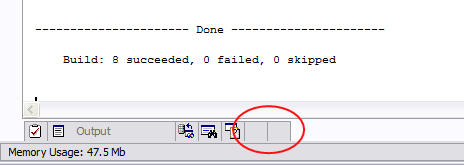
Please sign in to leave a comment.
Thank you for the report.
Actually, unit tests are runned in the separate AppDomain, and the primary
path of that domain IS the location the tested DLL. The problem may be that
these DLLs are shadow-copied by the framework.
What is the base path you search your XML is? I suggest to rely on the
AppDomain.Current settings...
--
Eugene Pasynkov
Developer
JetBrains, Inc
http://www.jetbrains.com
"Develop with pleasure!"
"Derek Price" wrote in message news:71a7df6414efb8c75b57e7e8c36a@news.intellij.net... First off - great job! I love the integrated unit testing. I was using TestDriven.net before, but I always missed the colors of NUnit and now I have them again. This is just a minor comment but it relates to all of the dockable windows like Find Results, Unit Test Runner, and File Structure. These windows really need icons to help distinguish them when they are hidden by other tabs. See attached screenshot. I may have found a bug in the Unit Test Runner area. When I try to run a NUnit test from the IDE, I get a system exception that it cannot find an xml file, MyXmlConfigFile.xml (names have been changed to protect the innocent...). This file is required by the test and is copied to the build folder as a custom build event. The file is definitely there. I can run the same test with NUnit 2.2 with no errors. Based on the exception text, you're launching the Unit Test Runner from the IDE application path and not the project output path (debug, release, etc.): ]]>
-
-
Read MyTestFailed: MyXmlConfigFile.xml System.IO.FileNotFoundException:
Could not find file "C:\Program Files\Microsoft Visual Studio .NET
2003\Common7\IDE\MyXmlConfigFile.xml".
File name: "C:\Program Files\Microsoft Visual Studio .NET
2003\Common7\IDE\MyXmlConfigFile.xml"
at System.IO.__Error.WinIOError(Int32 errorCode, String str)
at System.IO.FileStream..ctor(String path, FileMode mode, FileAccess
access, FileShare share, Int32 bufferSize, Boolean useAsync, String msgPath,
Boolean bFromProxy)
at System.IO.FileStream..ctor(String path, FileMode mode, FileAccess
access, FileShare share)
at System.Xml.XmlDownloadManager.GetStream(Uri uri, ICredentials
credentials)
at System.Xml.XmlUrlResolver.GetEntity(Uri absoluteUri, String role, Type
ofObjectToReturn)
at System.Xml.XmlTextReader.CreateScanner()
at System.Xml.XmlTextReader.Init()
at System.Xml.XmlTextReader.Read()
at System.Xml.XmlReader.MoveToContent()
at System.Data.DataSet.ReadXml(XmlReader reader, Boolean denyResolving)
at System.Data.DataSet.ReadXml(String fileName)
at MyCompany.Data.MyTestData.MyXmlConfigFile..ctor() in
C:\MyApplications.root\MyApplications\DataObjects\MyTestData\Resources\MyXmlConfigFile.cs:line
43
-
OK
-
</EXCEPTION MESSAGE>
Keep up the great work!
Thanks,
Derek
Hello Eugene,
We actually just load it locally with no path, just the filename. This has
never caused any issues with NUnit, TestDriven.net, or just running our application.
My temporary workaround is to just copy the xml file to the devenv path.
Thanks,
Derek
The better solution is to use
Path.Combine (Path.GetDirectory(GetType().Module.Location), "MyFile.xml")
--
Eugene Pasynkov
Developer
JetBrains, Inc
http://www.jetbrains.com
"Develop with pleasure!"
<derek.price@gmail.com> wrote in message
news:71a7df641a1b18c75becc5965afe@news.intellij.net...
>
>
>
>> Thank you for the report.
>>
>> Actually, unit tests are runned in the separate AppDomain, and the
>> primary path of that domain IS the location the tested DLL. The
>> problem may be that these DLLs are shadow-copied by the framework.
>>
>> What is the base path you search your XML is? I suggest to rely on the
>> AppDomain.Current settings...
>>
>
The problem is about Environment.CurrentDirectory property. It should be set to the directory that .NET test assembly originally locates. Please fix Resharper Unit test to follow the same behavior as NUnit GUI :)
Done
--
Eugene Pasynkov
Developer
JetBrains, Inc
http://www.jetbrains.com
"Develop with pleasure!"
"Nat" <no_mail@jetbrains.com> wrote in message
news:16099335.1121957708403.JavaMail.javamailuser@localhost...
So when is the next release coming so I can test this? :)
Likely Monday
--
Eugene Pasynkov
Developer
JetBrains, Inc
http://www.jetbrains.com
"Develop with pleasure!"
<derek.price@gmail.com> wrote in message
news:71a7df641ab528c75bfcd23362a2@news.intellij.net...
>
>> Done
>>
>
Hello Eugene,
Is this a 2.0 feature? For 1.1, I found Path.GetDirectoryName not Path.GetDirectory,
but I was unable to find Module.Location. Is there a 1.1 version?
Thanks,
Derek
Path.Combine( Path.GetDirectoryName(GetType().Module.????), "MyFile.xml" ) ;
Definitely, the " Path.GetDirectoryName"
I wrote that by memory and mistaked.
--
Eugene Pasynkov
Developer
JetBrains, Inc
http://www.jetbrains.com
"Develop with pleasure!"
"Derek Price" <derek.price@gmail.com> wrote in message
news:71a7df641a68e8c75cbdd93aec1f@news.intellij.net...
>
>
>
>
>> The better solution is to use
>> Path.Combine (Path.GetDirectory(GetType().Module.Location),
>> "MyFile.xml")
>
What about the Module.Location property. I couldn't find this one.
Hello Eugene,