Renaming bug

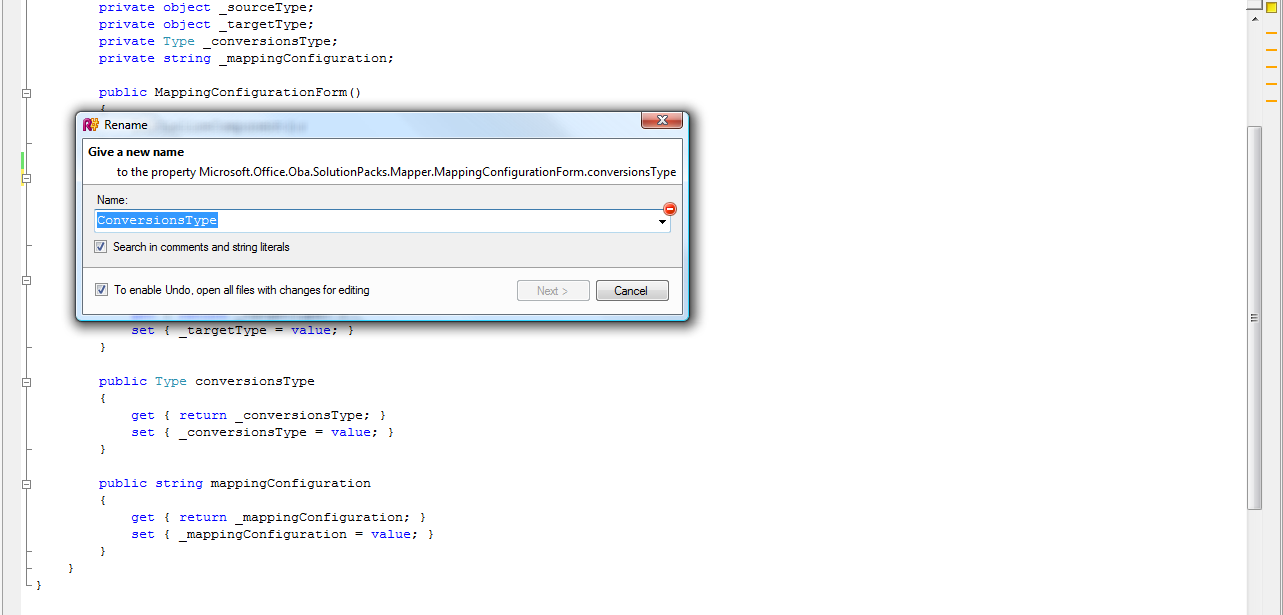
When I have a private variable named for example _test and then I create a public get/set property using R# it creates property named test. Now let's assume I want to rename it to Test. Then sometimes (actually always, but I can't create a simple repro steps -- I don't know if you have to restart VS or what causes this) it suggest the right name Test but Next button is disabled and error sign is displayed.
Please see attached screenshot. I consider this a small bug. Can you please fix it? I can't enter bug to Jira because I guess I don't have access there.
Thanks,
David.
Attachment(s):
Screenshot.png
Please sign in to leave a comment.
Hello David,
If you want ReSharper to create properly named properties you should set
up naming style. To do this go to ReSharper -> Options -> Naming style and
set correct suffixes for fields ("_" in your case). Hope this helps!
Oleg Stepanov
Software Developer
JetBrains, Inc
http://www.jetbrains.com
"Develop with pleasure!"
Ok thank you -- I will do that. On the other hand what I reported really seems like a bug because you can't click Next button.
David.
Hello David,
Yes, thanks for reporting the bug to us -- we will check that.
Oleg Stepanov
Software Developer
JetBrains, Inc
http://www.jetbrains.com
"Develop with pleasure!"
Hello,
What was the error message (displayed as a tooltip on the error sign)?
—
Serge Baltic
JetBrains, Inc — http://www.jetbrains.com
“Develop with pleasure!”
Hello Serge,
I believe he means the red stop sign bitmap to the right of the Name TextBox
on the Rename dialog he included in his post.
>> but Next button is disabled and error sign is
>> displayed.
Hello,
… which has an error message.
—
Serge Baltic
JetBrains, Inc — http://www.jetbrains.com
“Develop with pleasure!”
Exactly -- the red sign. To enable the Next button I either have to:
select the same name from the combo box or
type a letter at the end and then delete it (I changed the name but in fact the name is still the same)
Thanks,
David.
The work around I have learned for this, since the box comes up with the item selected, is to hit CTRL-C, CTRL-V to copy and paste the same item back, then the next option is automatically selected, you can just hit Enter... its not right, but it is better I think than any of the other work arounds.
Ciao
Thanks, this is a good one.
Hello Serge,
of course, I must be getting tired!
>> I believe he means the red stop sign bitmap
>>