Syntax coloring gone nuts

Starting a few days ago (I'm relatively fast updating to the newest EAP each day), I got a strange behaviour:
The syntax coloring gone completely nuts.
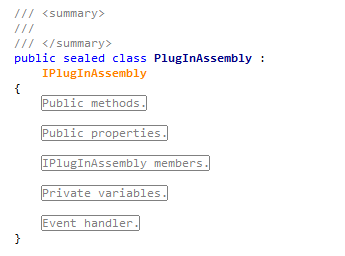
When a .CS file is opened for the first time, a fraction of a second, the correct VS syntax coloring is shown, as this screenshot shows:
http://magerquark.de/data/misc/resharper-coloring-01.png
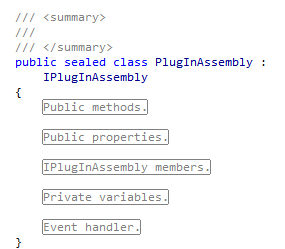
then, the ReSharper syntax coloring seems to be applied and then all the keywords, identifierers, etc. are recolored:
http://magerquark.de/data/misc/resharper-coloring-02.png
(Look at the class name and the interface)
I don't know when it started. I recall that I accidentially pressed some weird key combinations (like CTRL+K and something like that), but I doubt that there is a key command for "Confuse the syntax coloring of the user" :)
Can someone tell me how to get things normal, again?
Thanks
Uwe
Please sign in to leave a comment.
Any hints please, whether this is my own fault?
Hello Uwe,
What colors are set for the highlightings in the Tools/Options/Fonts and
Colors options page?
Best regards,
Andrey Simanovsky
Thanks for your reply, Andrey
I already double-checked that the colors are correct.
In fact all the correct colors +are +being displayed for approx. half a second, until resharper applies the false colors (and removes the bold states, too).
BTW: If you recommend me to do a fresh install, I'll try to do this. (But maybe it is avoidable :))
Hello Uwe,
Did you check colors, which begin with "ReSharper"? We use own color set
to avoid conflicts and to provide additional capabilities, like different
colors for different element kinds, e.g. type name, field name, etc.
You can also turn off identifier highlighting in ReSharper|Options|Highlighting|Color
Identifiers, but this will also remove ReSharper's advanced tooltips from
identifiers.
Sincerely,
Ilya Ryzhenkov
JetBrains, Inc
http://www.jetbrains.com
"Develop with pleasure!"
UK> Thanks for your reply, Andrey
UK>
UK> I already double-checked that the colors are correct.
UK>
UK> In fact all the correct colors +are +being displayed for
UK> approx. half a second, until resharper applies the false colors (and
UK> removes the bold states, too).
UK>
Thanks, I will try that.
Right now, unfortunately, I do have to fight with an expired license (again). 8th may expiration. Today. That is really annoying.
How to activate ReSharper 3 EAP now?
Reminder to myself: To turn this issue of, I selected
"Code Inspection" | "Settings" | "Color Identifiers" to be unchecked.
http://magerquark.de/data/misc/resharper-coloring-03.png