Preventing autocomplete when typing out arguments for lambda

Howdy,
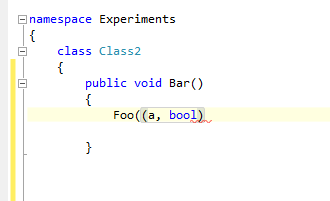
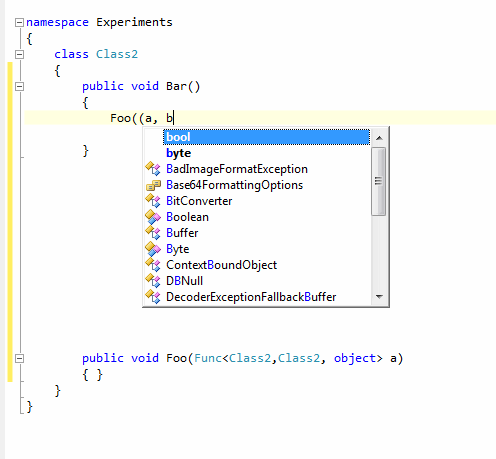
When I'm typing out arguments for a lambda as shown below, upon typing 'b' I get the autocomplete window coming up. If I then type ')' I get the behaviour as shown in the second picture.
R# autocomplete has been fine for me other than this. Is there any way to disable it? I've tried fiddling with some of the options but haven't had much luck.
I am running R# 5.0.1659.36
Attachment(s):
resharper2.png
resharper1.png
Please sign in to leave a comment.
Hello Andy,
At the moment there's no other way exept hiding the code completion window
(with Esc) while entering lambda parameter names. By the way, you can use
Smart Completion to insert lambdas without having to enter parameter names:
invoke ReSharper | Edit | Smart Code Completion when you need to insert lambda.
Thank you!
Andrey Serebryansky
Senior Support Engineer
JetBrains, Inc
http://www.jetbrains.com
"Develop with pleasure!"
Thanks for clearing that up Andrey.
I'm aware of the smart completion, but I have never quite understood the the parameter naming it chooses for lambdas.
If I declare an event
public event EventHandler<AssemblyLoadEventArgs> foo;
If I type foo += <Ctrl+Alt+Space> I can get:
foo += (sender, args) => { };
foo += (o, eventArgs) => { };
foo += (sender1, loadEventArgs) => { };
foo += (o1, assemblyLoadEventArgs) => { };
foo += (sender2, args1) => { };
All of these were obtained by typing foo += <Ctrl+Alt+Space> {}; <Enter> one after another.
I find it a bit odd :)