[219] Identifier Highlighting Spacing Problem

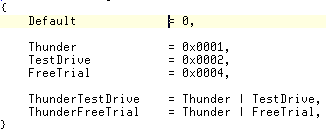
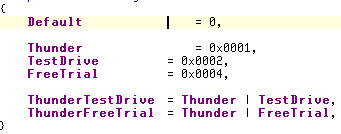
With identifier highlighting turned on I get a spacing problem with an enum. See the attached screen shots for what I'm talking about. Notice that the caret position never changes but the text position does.
Attachment(s):
highlight_off.jpg
highlight_on.jpeg
Please sign in to leave a comment.
Hello Troy,
this is a well known problem with VS 2003 and perhaps with VS 2005 too. To
workaround it, either change your font to e.g. Courier New,
or disable bold for the 'ReSharper Constant' display item (Tools|Options|Environment|Fonts
and Colors).
Regards,
Dmitry Shaporenkov
JetBrains, Inc
http://www.jetbrains.com
"Develop with pleasure!"
Awesome, thank you, good to have highlighting back on.
By the way the latest build (219 for me) is running great on my machine, nice work, it's getting very stable.
Hello Troy,
The other alternative (if you don't want to use a fixed-space-font is to
increase the tab-size
Ronnie