goto declaration context menu bug

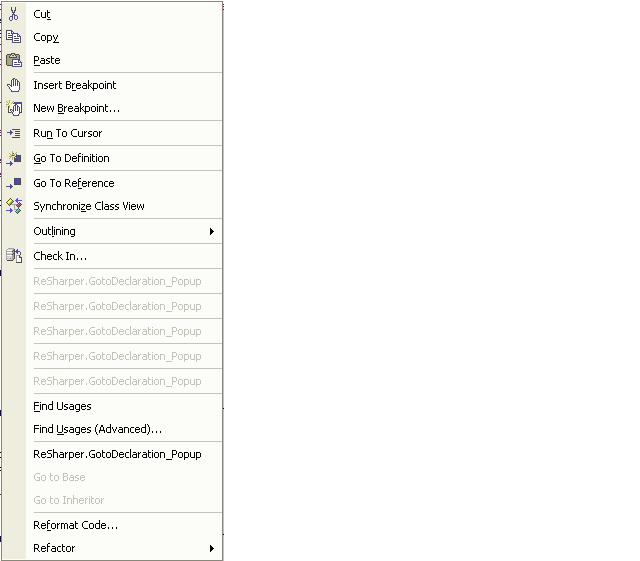
i am experiencing weird context menu using resharper, i have a number of gotodeclaration menus... see attached pic...
Attachment(s):
contextmenu.JPG
Please sign in to leave a comment.
Hello Joey,
what build of ReSharper you're using?
Regards,
Dmitry Shaporenkov
JetBrains, Inc
http://www.jetbrains.com
"Develop with pleasure!"
1.5.1 sir
Hello Joey,
does reinstalling ReSharper help to get rid of this problem?
Regards,
Dmitry Shaporenkov
JetBrains, Inc
http://www.jetbrains.com
"Develop with pleasure!"
it's fixed now sir, thanks!
more power!
one more thing, it's now gone on my context menu, i forgot how i got it there the first time...
Hello Joey,
could you please clarify what do you mean? ReSharper entries should be
in the context menu, they are added there automatically when you activate
ReSharper.
Regards,
Dmitry Shaporenkov
JetBrains, Inc
http://www.jetbrains.com
"Develop with pleasure!"
i was referring to the gotodeclaration context menu as this post subject suggest. upon reinstalling, i couldn't find the said menu entry, but the others are there (find usage, etc.). now it's back... i hope i don't encounter the redundant yet disabled gotodeclarion context menu entries again...
Hello Joey,
you can also try to run 'devenv.exe /setup' to get rid of such problems.
But be careful:
this will delete all your UI customization (including custom toolbars), though
it is irrelevant
if you don't have them.
Regards,
Dmitry Shaporenkov
JetBrains, Inc
http://www.jetbrains.com
"Develop with pleasure!"
????[/url]
????[/url]
????[/url]
sql server??[/url]
raid????[/url]
sql?????[/url]
Doing a repair install of 1.5.1 does not clear these multiple context menu items for me.
(Also, on one of my projects, but apparently only that one, absolutely no symbols can be resolved, not even "System", even after uninstalling and reinstalling ReSharper.)
Attachment(s):
goto.jpg
Have you tried shutting down VS.Net, and then going through and deleting all
the "_ReSharper*" cache directories, and then reloading? Just an idea.
"Adam Vandenberg" <no_mail@jetbrains.com> wrote in message
news:19058047.1125348559080.JavaMail.javamailuser@localhost...
>
Didn't help; even when I blow away all the caches the usual ReSharper loading dialog only shows onscreen for a split scecond instead of the usual "a while" while it reparses the project.
Alright, got multiple pop-ups under control, though the symbols in that project still aren't resolving.
Hello Adam,
please describe in more detail the project where symbols are not resolved.
What kind of project is it? What assemblies/other projects does it reference?
And what symbols aren't resolved - only those declared externally (in referenced
assemblies/projects)
or all symbols including those declared in that very project?
Thanks.
Regards,
Dmitry Shaporenkov
JetBrains, Inc
http://www.jetbrains.com
"Develop with pleasure!"
In the process of trying to trim my .sln down to small repro case, the bug stopped happening.
If it starts again I'll try to save it and get a specific small set of files that repro.
Thanks,
Adam V.