Resharper does not process one file in a project

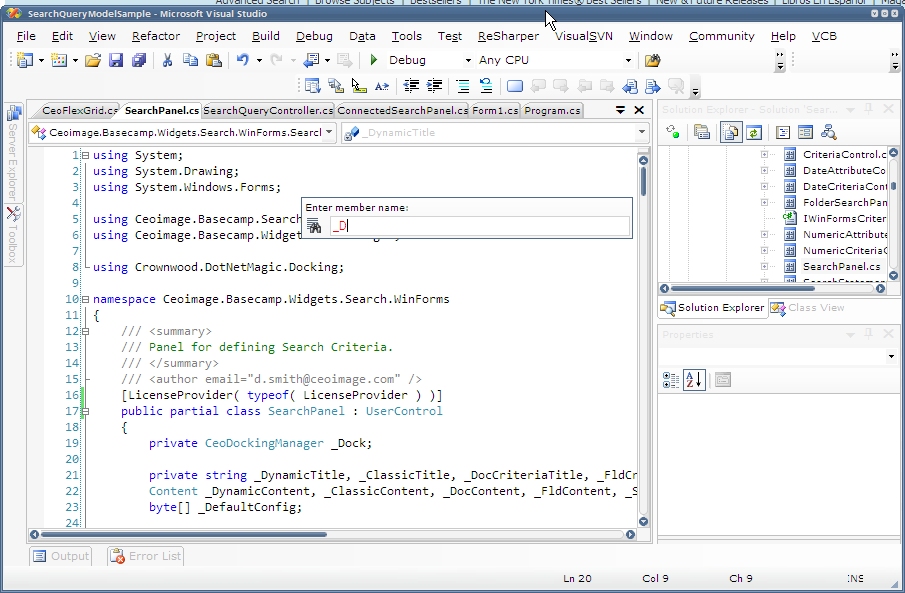
As per the screenshot, Resharper does not process (at least) one file in a project where it processes others. As you can see, the Resharper code analysis gutter is missing on the right-side of the editor window and the Search for Member dialog does not find members that are clearly present.
How can I force Resharper to analyze this file?
Attachment(s):
unanalyzedFile.jpg
Please sign in to leave a comment.
Hello flipdoubt,
does closing and re-opening this file help ReSharper to recognize it? If
it doesn't,
does re-opening the solution make the trick?
Dmitry Shaporenkov
JetBrains, Inc
http://www.jetbrains.com
"Develop with pleasure!"
Tried it, no luck.
This worked, but this is not a satisfactory solution for really large .SLNs.
I tell Microsoft the same thing about WinForms designer issues the require
me to close and re-open VS.NET.
This file was not recently added to the project. It had been there for quite
some time. Interestingly, Resharper did process a control that extends this
control that Resharper seems to ignore. Now that the base control can be
processed, however, I cannot reproduce the scenario.
Hello flipdoubt,
so if you are able to notice the pattern which source file are not processed
after having been added to the project,
please inform us.
Dmitry Shaporenkov
JetBrains, Inc
http://www.jetbrains.com
"Develop with pleasure!"
>> does closing and re-opening this file help ReSharper to recognize it?
>>
>> If it doesn't, does re-opening the solution make the trick?
>>