Optimize Using when using inside namespace

Having searched through the forums, I found how to keep the "Optimize Usings" method to keep the usings inside a namespace.
Now two things I still dislike, maybe you can give me a short note whether/how to get rid of them:
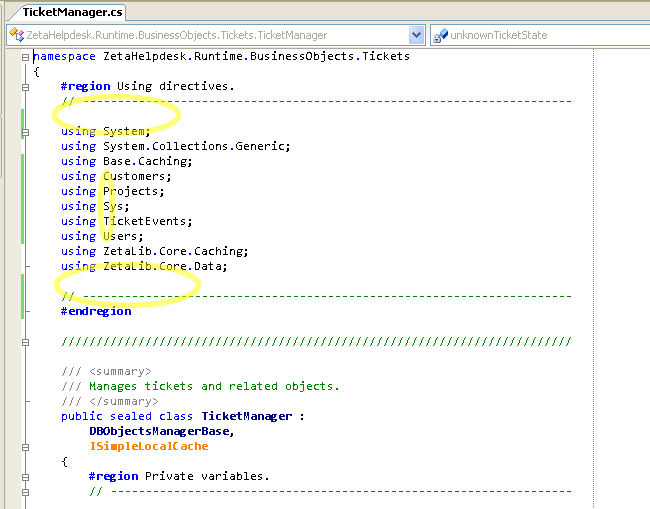
The first attached image shows with "manually" optimized using directives. As you can see, I like to have a whitespace before and after the using directives, in addition to two comment lines. (See yellow circles).
In the second attached image, taked after letting ReSharper (version 3.0, downloaded today) optimize the using directives. As you can see (orange circles), the two blank lines are removed (orange circles). Also, the previously short qualified namespaces are added again (see orange circled gray text).
Question: Any chance to prevent ReSharper from removing the blank lines and adding the gray text?
Thanks
Uwe
Attachment(s):
resharper-using-uwekeim-02.jpg

resharper-using-uwekeim-01.jpg
Please sign in to leave a comment.
Adding gray text is definetly a bug, and will be fixed shortly. Thank you
for report.
What about extra blank lines - this also could be fixed, but the priority of
this request would be far too low
--
Eugene Pasynkov
Developer
JetBrains, Inc
http://www.jetbrains.com
"Develop with pleasure!"
"Uwe Keim" <uwe@magerquark.de> wrote in message
news:16509182.1175631858826.JavaMail.itn@is.intellij.net...
>
>
>
>
>
Was this ever fixed (adding the gray text)
Yes, it is fixed
--
Eugene Pasynkov
Developer
JetBrains, Inc
http://www.jetbrains.com
"Develop with pleasure!"
"chris ortman" <no_reply@jetbrains.com> wrote in message
news:28094733.1201128931255.JavaMail.itn@is.intellij.net...