Disable or re-bind "Complete Statement"

Is there a way to disable "Complete Statement" or bind it to a different key shortcut?
By default it is bound to Ctrl-Shift-Enter. This hides Visual Studio's Edit.LineOpenBelow, which I use a lot. I have tried setting R#'s Keyboard Shortcuts option to "None", and even resetting my VS keyboard mappings to factory default, but to no avail. Only by turning off R# entirely can I get LineOpenBelow back.
I am using VS2010.
Thanks,
-Steve
Please sign in to leave a comment.
Hello Steve,
You can manually re-assign CtrlShiftEnter to 'Edit.LineOpenBelow' under
Tools > Options > Environment > Keyboard. Please make sure to use 'Text Editor'
context. Thank you!
Andrey Serebryansky
Support Engineer
JetBrains, Inc
http://www.jetbrains.com
"Develop with pleasure!"
Hi Andrey,
Thank you for the fast response.
Unfortunately, that solution does not work.
I had actually checked that before, and the key combination was already bound to LineOpenBelow in Tools > Options > Environment > Keyboard. Just to be sure, I un-bound and re-bound it just now. Still no luck. Here is the specific problem I am having. I have a block of code like the following:
private void MyMethod()
{
try
{
// Some code.
}
}
My cursor is on the line with the closing brace of the try, all the way at the left margin. I want to add the catch, so I hit Ctrl-Shift-Enter to open a line below the closing brace of the try. With R# turned on, the behavior is that a line is opened above the brace and the cursor is placed inside the try block. With R# turned off, the line is opened after the closing brace.
-Steve
Hello Steve,
I'm afraid I wasn't able to reproduce this behavior. Could you please send
a screenshot demonstrating the keyboard binding of 'Edit.LineOpenBelow' command
under Tools > Options > Environment > Keyboard? Thank you!
Andrey Serebryansky
Support Engineer
JetBrains, Inc
http://www.jetbrains.com
"Develop with pleasure!"
[5.1.1704]
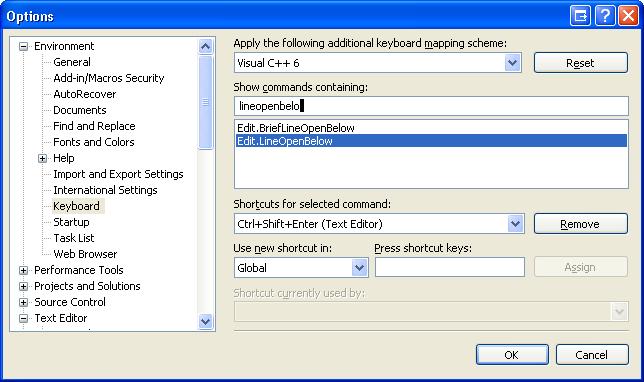
FWIW, I also have Ctrl+Shift+Enter shortcut to Edit.LineOpenBelow. Isn't RS "hooking" into this shortcut similar to SelectCurrentWord and the Ctrl+Backspace behavior etc.?
(if I disable RS the LineOpenBelow becomes "lineopenbelow" and not "complete statement").
Hello Steve,
I've created a bug-report in our tracker: http://youtrack.jetbrains.net/issue/RSRP-181587
and you're welcome to monitor its status. Thank you!
Andrey Serebryansky
Support Engineer
JetBrains, Inc
http://www.jetbrains.com
"Develop with pleasure!"
Hello,
Actually, yes, R# is overriding the VS command (because R# behavior is, supposedly,
covering all of the VS cases plus adding some more value). You have just
indicated a case in which R# fails to do the expected thing, which I think
should be fixed by updating the R# feature behavior in the first place.
Sounds like what End+Enter keystroke does. Does it fit as a workaround for
now?
—
Serge Baltic
JetBrains, Inc — http://www.jetbrains.com
“Develop with pleasure!”
Hello Steve,
Yes, we actually override the VS LineOpenBelow command so it functions as
our CompleteStatement.
As a workaround you can create a macro for "End Enter" and map it to CtrlShiftEnter.
Does it solves the issue for now?
-
Slava Tutushkin
JetBrains, Inc - http://www.jetbrains.com
"Develop with pleasure!"