"This pre-release build of JetBrains ReSharper 5.1 has expired" ???

All of us at my company are using the version of ReSharper that is currently available by clicking the Download button (ReSharperSetup.5.1.1751.8.msi).
We all have legitimate license keys and ReSharper has been working normally until today. Today, whenever we start Visual Studio (2008 or 2010), we are all seeing this message: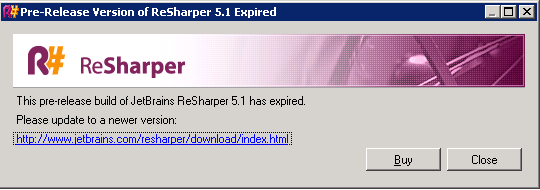
The only other versions available for download appear to be nightly builds.
Please update the normal download version so that we can develop with pleasure again :-)
Please sign in to leave a comment.
Same here...
Same issue for me.
Same problem here, tried uninstall/reinstall but no joy ..
I've got the same issue.
Did some googling and found this article where it seems an earlier version of 5.1.1. was accidentally published (http://dotnet.sys-con.com/node/1519004).
I've got release 5.1.1751.8 installed but something's obviously gone awry in this release.
I hope a new build resolving this issue is published soon.
We're now using build 5.1.1754.7 while we wait. So far, so good...
Pretty sure this is Seans fault....
Just happened now (Sydney, Australia, around 2:30pm)
Same message here. Using 5.1.1751.8.
Where is the QC?
Hello everyone,
Sorry for inconvenience, it seems something really weird happened. We are
trying to understand it, but it seems that some EAP checks passed into release
through our QA cycles... Meanwhile, please use http://confluence.jetbrains.net/display/ReSharper/ReSharper5.1.2Bugfix+Builds
Thank you for understanding, we'll publish something really soon.
Sincerely,
Ilya Ryzhenkov
JetBrains, Inc
http://www.jetbrains.com
"Develop with pleasure!"
SR> All of us at my company are using the version of ReSharper that is
SR> currently available by clicking the Download button
SR> (ReSharperSetup.5.1.1751.8.msi).
SR> We all have legitimate license keys and ReSharper has been working
SR> normally until today. Today, whenever we start Visual Studio (2008
SR> or 2010), we are all seeing this message:
SR> Image:ReSharper expired message.png
SR> The only other versions available for download appear to be nightly
SR> builds.
SR> Please update the normal download version so that we can develop
SR> with pleasure again :)
SR>
SR> ---
SR> Original message URL:
SR> http://devnet.jetbrains.net/message/5275008#5275008
Same here. Whole shop without resharper this afternoon.
Jim
Hello Steven,
We've published an updated build at http://www.jetbrains.com/resharper/download/index.html
and we recommend installing it in order to avoid this problem. Thank you!
Andrey Serebryansky
Senior Support Engineer
JetBrains, Inc
http://www.jetbrains.com
"Develop with pleasure!"
I have installed this version of Resharper but now Resharper does not even load in VS 2010. When I go to Tools/Options in Visual Studio and click on Resharper it says 'Resharper has been suspended'. If I click on resume nothing happens :-(
Paul Cripps
Hello,
Could you please try to do full uninstall and then install R# again. Let me know ASAP if it helps you.
--
Kirill Falk
JetBrains Inc.
"Develop with Pleasure!"
Kirill,
I have already tried a full uninstall followed by a reinstall and it did not help.
Regards,
Paul
Please try to run VS 2010 (devenv.exe) with /setup and /resetskippkgs command line key. If this will not help add
the following key /ReSharper.LogFile C:\log.txt /ReSharper.LogLevel Verbose' and send logfile to us for investigation.
Thanks in advance!
--
Kirill Falk
JetBrains Inc.
"Develop with Pleasure!"
Kirill,
I created the log file and had a quick look in it. There was a line 'Access to the path 'C:\Users\username\AppData\Local\JetBrains\ReSharper\v5.1\vs10.0\typeIndex.xml' is denied.
I had a look at this file and found that it had become set as 'read only'. I unset the read only flag and now resharper is back working :-)
Thanks for your help.
Regards,
Paul
Thanks for your quick response, the new version is working for us.
I simply installed it over the existing nightly build that we had been using temporarily, and it did the expected uninstall & reinstall for VS2008 & VS2010. I first tried it with VS2008 with no problems, then started VS2010 and RS also started normally. Unlike Paul, I did not need to change any file attributes, however I'm using 2003 Server (in a VM).
Regards, Steve