To-do Explorer: RegEx pattern

Hi there,
I'd like to use the To-do explorer to list all of the Debug messages in my solution. I tried to create a pattern based on the todo pattern but in the To-do explorer the rest of the line isn't displayed.
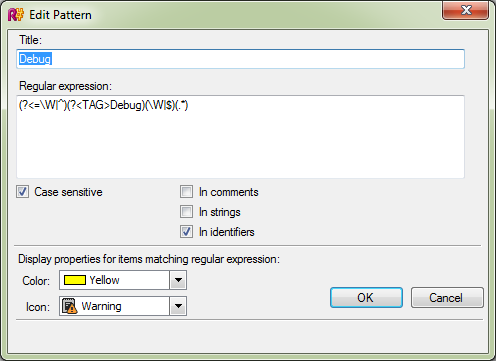
This is the pattern what I use: (?<=\W|^)(?<TAG>Debug)(\W|$)(.*)
What should I change to display the rest of the line after the "Debug" keyword?
Thank you in advance
Best Regards,
Istvan
Please sign in to leave a comment.
Hello Istvan
Could you please provide an example of a line that should match that pattern and how is it displayed by ReSharper? Thank you!
Andrey Serebryansky
Software Developer
JetBrains, Inc
http://www.jetbrains.com
"Develop with pleasure!"
Hi Andrey,
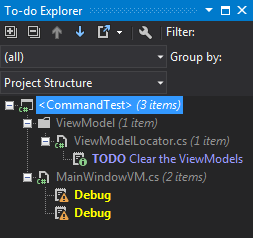

This is the To-do explorer:
This is the code:
System.Diagnostics.Debug.WriteLine("At {0} enabled: {1}", elapsedEventArgs.SignalTime.ToLongTimeString(), _canExecute);
And this is the Edit Pattern window:
What I'd like to achieve is that the To-do Explorer shows the rest of the line after the "Debug" keyword just like after the "TODO" pattern.
Thank you
Best Regards,
Istvan
Hello Istvan
I'm afraid this is not possible at the moment, as ReSharper checks and highlights only matching identifier itself and not the whole statement. As a workaround, you can add some keyword to your debug messages and switch your pattern to match strings. Thank you!
Andrey Serebryansky
Software Developer
JetBrains, Inc
http://www.jetbrains.com
"Develop with pleasure!"
Thank you for the answer.
Have a nice day
Istvan