but in the mean time the red strike through has disappeared I am not aware at excat what point of time it disappeared and thus can not give any details
One significant changes since that screen shot is that I installed dotCover 2.7.3 with evaluation license
I did never came arround to install a newer version, but I now probably know how this can be triggered: the red strike though dissapearead long time ago but suddenly got back, here is what I did:
given 2 assemblies A and B A contains: the test: NamespaceA.TestFixtureA.TestA the test fixture setup: NamespaceA.SetupFixture B contains: the test case: NamespaceB.TestFixtureB.TestB the test fixture setup: NamespaceA.SetupFixture // notice this is in wrong namespace and same name as in assembly A
how to make the red strike through appear: 1) Run all tests 2) Go to NamespaceA.SetupFixtureB 3) Make auto corrrection to the fixture setup in assembly B to correct manespace i.e. NamespaceB.SetupFixture 4) The other NamespaceA.SetupFixture in assembly A got the strike through 5) The red strikethorough disappeared after a restart of visual studio

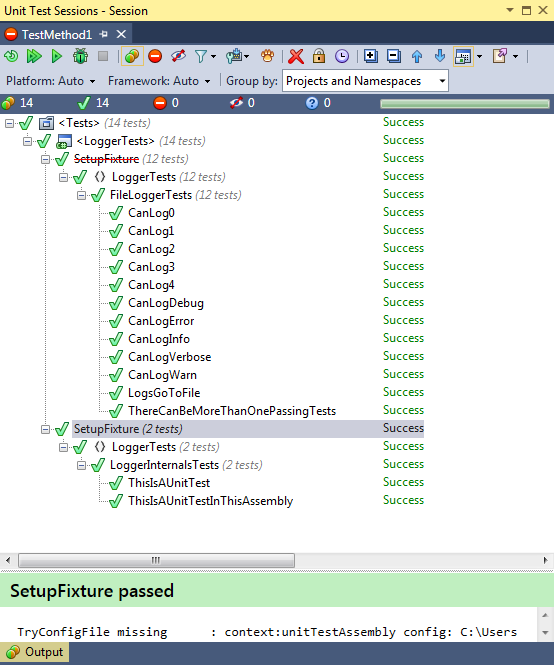
Hello Jens,
Please specify ReSharper version you use.
Thanks!
This happened on ReSharper version 8.2.0.2160
but in the mean time the red strike through has disappeared
I am not aware at excat what point of time it disappeared and thus can not give any details
One significant changes since that screen shot is that I installed dotCover 2.7.3 with evaluation license
Thanks
Jens
Hello Jens,
Please try installing ReSharper 8.2.3 http://download.jetbrains.com/resharper/ReSharperSetup.8.2.3000.5176.msi and then try reproducing the issue once again.
Thanks!
This has happened again
I did never came arround to install a newer version, but I now probably know how this can be triggered:
the red strike though dissapearead long time ago but suddenly got back, here is what I did:
given 2 assemblies A and B
A contains:
the test: NamespaceA.TestFixtureA.TestA
the test fixture setup: NamespaceA.SetupFixture
B contains:
the test case: NamespaceB.TestFixtureB.TestB
the test fixture setup: NamespaceA.SetupFixture // notice this is in wrong namespace and same name as in assembly A
how to make the red strike through appear:
1) Run all tests
2) Go to NamespaceA.SetupFixtureB
3) Make auto corrrection to the fixture setup in assembly B to correct manespace i.e. NamespaceB.SetupFixture
4) The other NamespaceA.SetupFixture in assembly A got the strike through
5) The red strikethorough disappeared after a restart of visual studio