Auto Import of Missing Namespace not Working in TypeScript

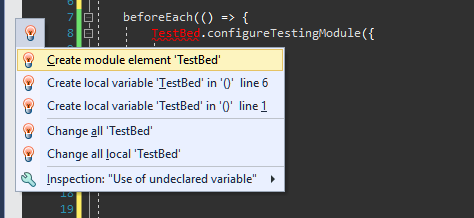
I'm using version 2017.2.1 and trying to use the functionality of importing a missing namespace in TypeScript via either the shortcut key (Alt + Enter) or via the popup helper. However neither is working and it isn't finding the Angular module I need to import. I've tried both methods so it's not a keyboard mapping issue as (Alt + Enter) actually brings up the popup, but it's not working. However I can manually type in the namepsace and it resolves immediately, so it's obviously available. According to this page (https://www.jetbrains.com/help/resharper/Coding_Assistance__Importing_Namespaces.html) this is a supported feature in TypeScript. What do I need to do to get this working correctly please?
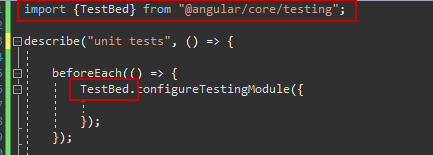
Working after manually importing:
Please sign in to leave a comment.
Hello Allenc!
Thank you for the feedback.
Turns out this scenario is not supported yet, I've filed corresponding issue - https://youtrack.jetbrains.com/issue/RSRP-466978
Please feel free to comment or vote for it.
Thank you.
Voted, thanks!