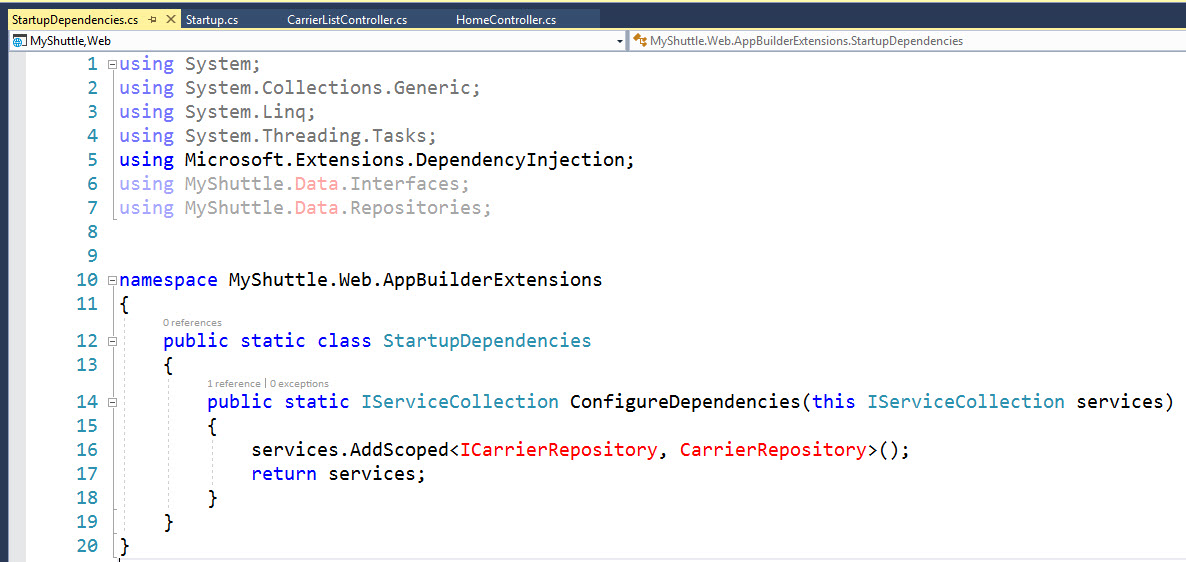
All references to other projects rendered in "red" when Resharper is enabled.

Have simple ASP.NET Core web app with references to both data services and data models projects.
When Resharper is enabled in VS 2017, all code references to the external assemblies are rendered in RED. When I disable Resharper, the references are no longer RED. Although the solution builds when Resharper is enabled, how can i get rid of the RED?
Please sign in to leave a comment.
Hello Rob!
Thank you for contacting us.
Could you please try removing caches as described in the following help article - https://resharper-support.jetbrains.com/hc/en-us/articles/206546989-ReSharper-stopped-working-for-a-single-specific-solution
Please let us know if it helps.
Thank you.