ReSharper 2017.1

Hello!
How I can used in Visual Studio 2017 Enterprise (15.1 or 15.2) ReSharper 2017.1 with default XML documentation in methods?
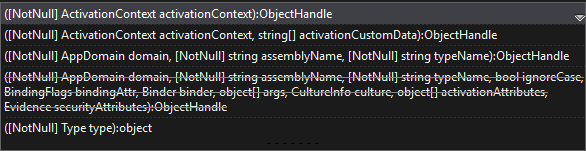
For example I show popup window method System.Activator.CreateInstance():
In this screenshot I can learn about this method. (ReSharper is delete)
 In this screenchot I can't learn about this method in VS. (ReSharper is install)
Please sign in to leave a comment.
Hello!
Thank you for contacting us.
<summary> section of XML documentation should be showed if Parameter info is turned on. Please check it in ReSharper | Options | Environment | IntelliSense | Parameter info | Automatically show parameter info.
Also please try turning on 'Display extended info' in the same options section.
Please let us know if it helps.
Thank you.
In first screenshot I can read "Creates an instance of the..", but I can't get this information with ReSharper.
You might want to look at the "Enhanced Tooltip" plugin:
https://github.com/MrJul/ReSharper.EnhancedTooltip/
When I install an add-on I have a number of errors. Screenshot and Log:
These parameters have been enabled all the time.
This also did not help me:
Please try the following steps:
Thank you for the reply.
Concerning plugin unfortunately it doesn't work with the latest ReSharper version, see related issue - https://youtrack.jetbrains.com/issue/RSRP-463582
Still parameter info should be showed expanded by default. Is the problem reproduced with some specific method only or with any method?
Thank you.
All methods except custom. (To which the XML documentation was written)
Seems to be the following bug - https://youtrack.jetbrains.com/issue/RSRP-465412
Please feel free to comment or vote for it.
Same issue https://resharper-support.jetbrains.com/hc/en-us/community/posts/115000464624--Resharper-Not-displaying-overloads-properly
If anyone experiences such problem please install ReSharper 2017.2 EAP build - https://www.jetbrains.com/resharper/eap/. It should resolve the problem.