ReSharper 2017.1

Hello!

How I can used in Visual Studio 2017 Enterprise (15.1 or 15.2) ReSharper 2017.1 with default XML documentation in methods?

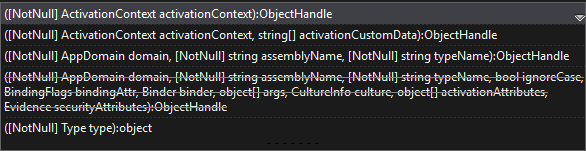
For example I show popup window method System.Activator.CreateInstance():

In this screenshot I can learn about this method. (ReSharper is delete)

In this screenchot I can't learn about this method in VS. (ReSharper is install)
0
11 comments
Official comment

Hello!

Thank you for contacting us.

<summary> section of XML documentation should be showed if Parameter info is turned on. Please check it in ReSharper | Options | Environment | IntelliSense | Parameter info | Automatically show parameter info.

Also please try turning on 'Display extended info' in the same options section.

Please let us know if it helps.

Thank you.

In first screenshot I can read "Creates an instance of the..", but I can't get this information with ReSharper.

0

You might want to look at the "Enhanced Tooltip" plugin:
https://github.com/MrJul/ReSharper.EnhancedTooltip/

0

When I install an add-on I have a number of errors. Screenshot and Log:

  • Error resolving type Microsoft.VisualStudio.Text.ITextBuffer from assembly “Microsoft.VisualStudio.Text.Data, Version=11.0.0.0, Culture=neutral, PublicKeyToken=b03f5f7f11d50a3a”, request originating from assembly “GammaJul.ReSharper.EnhancedTooltip, Version=3.2.1.0, Culture=neutral, PublicKeyToken=null”. Could not find a referenced assembly by the TT_ASSEMBLYREF token.
  • Error resolving type Microsoft.VisualStudio.Editor.IVsEditorAdaptersFactoryService from assembly “Microsoft.VisualStudio.Editor, Version=11.0.0.0, Culture=neutral, PublicKeyToken=b03f5f7f11d50a3a”, request originating from assembly “GammaJul.ReSharper.EnhancedTooltip, Version=3.2.1.0, Culture=neutral, PublicKeyToken=null”. Could not find a referenced assembly by the TT_ASSEMBLYREF token.
  • Error resolving type Microsoft.VisualStudio.Text.Classification.IClassificationFormatMapService from assembly “Microsoft.VisualStudio.Text.UI.Wpf, Version=11.0.0.0, Culture=neutral, PublicKeyToken=b03f5f7f11d50a3a”, request originating from assembly “GammaJul.ReSharper.EnhancedTooltip, Version=3.2.1.0, Culture=neutral, PublicKeyToken=null”. Could not find a referenced assembly by the TT_ASSEMBLYREF token.
  • Error resolving type Microsoft.VisualStudio.Text.Classification.IEditorFormatMapService from assembly “Microsoft.VisualStudio.Text.UI.Wpf, Version=11.0.0.0, Culture=neutral, PublicKeyToken=b03f5f7f11d50a3a”, request originating from assembly “GammaJul.ReSharper.EnhancedTooltip, Version=3.2.1.0, Culture=neutral, PublicKeyToken=null”. Could not find a referenced assembly by the TT_ASSEMBLYREF token.
  • Error resolving type Microsoft.VisualStudio.Text.Classification.IClassificationFormatMap from assembly “Microsoft.VisualStudio.Text.UI.Wpf, Version=11.0.0.0, Culture=neutral, PublicKeyToken=b03f5f7f11d50a3a”, request originating from assembly “GammaJul.ReSharper.EnhancedTooltip, Version=3.2.1.0, Culture=neutral, PublicKeyToken=null”. Could not find a referenced assembly by the TT_ASSEMBLYREF token.
  • Error resolving type Microsoft.VisualStudio.Text.Classification.IClassificationFormatMap from assembly “Microsoft.VisualStudio.Text.UI.Wpf, Version=11.0.0.0, Culture=neutral, PublicKeyToken=b03f5f7f11d50a3a”, request originating from assembly “GammaJul.ReSharper.EnhancedTooltip, Version=3.2.1.0, Culture=neutral, PublicKeyToken=null”. Could not find a referenced assembly by the TT_ASSEMBLYREF token.
  • Error resolving type Microsoft.VisualStudio.Text.Classification.IClassificationFormatMapService from assembly “Microsoft.VisualStudio.Text.UI.Wpf, Version=11.0.0.0, Culture=neutral, PublicKeyToken=b03f5f7f11d50a3a”, request originating from assembly “GammaJul.ReSharper.EnhancedTooltip, Version=3.2.1.0, Culture=neutral, PublicKeyToken=null”. Could not find a referenced assembly by the TT_ASSEMBLYREF token.
  • Error resolving type Microsoft.VisualStudio.Text.Classification.IClassificationTypeRegistryService from assembly “Microsoft.VisualStudio.Text.Logic, Version=11.0.0.0, Culture=neutral, PublicKeyToken=b03f5f7f11d50a3a”, request originating from assembly “GammaJul.ReSharper.EnhancedTooltip, Version=3.2.1.0, Culture=neutral, PublicKeyToken=null”. Could not find a referenced assembly by the TT_ASSEMBLYREF token.
  • Error resolving type Microsoft.VisualStudio.Text.Classification.IClassificationFormatMapService from assembly “Microsoft.VisualStudio.Text.UI.Wpf, Version=11.0.0.0, Culture=neutral, PublicKeyToken=b03f5f7f11d50a3a”, request originating from assembly “GammaJul.ReSharper.EnhancedTooltip, Version=3.2.1.0, Culture=neutral, PublicKeyToken=null”. Could not find a referenced assembly by the TT_ASSEMBLYREF token.
  • Error resolving type Microsoft.VisualStudio.Text.Classification.IClassificationTypeRegistryService from assembly “Microsoft.VisualStudio.Text.Logic, Version=11.0.0.0, Culture=neutral, PublicKeyToken=b03f5f7f11d50a3a”, request originating from assembly “GammaJul.ReSharper.EnhancedTooltip, Version=3.2.1.0, Culture=neutral, PublicKeyToken=null”. Could not find a referenced assembly by the TT_ASSEMBLYREF token.


0

These parameters have been enabled all the time.

0

This also did not help me:

Please try the following steps: 

- uninstall ReSharper using installer;
- start the installer, go to "Options" and uncheck "Keep extensions from previous installations", then perform a usual installation;
- try to install a plugin.
Let me know about the results.
0

Thank you for the reply.

Concerning plugin unfortunately it doesn't work with the latest ReSharper version, see related issue - https://youtrack.jetbrains.com/issue/RSRP-463582

Still parameter info should be showed expanded by default. Is the problem reproduced with some specific method only or with any method?

Thank you.

0

All methods except custom. (To which the XML documentation was written)

0

Seems to be the following bug - https://youtrack.jetbrains.com/issue/RSRP-465412

Please feel free to comment or vote for it.

0

If anyone experiences such problem please install ReSharper 2017.2 EAP build - https://www.jetbrains.com/resharper/eap/. It should resolve the problem.

0

Please sign in to leave a comment.