dotCover Option To Highlight Lines Of Code

For this issue, I'm using ReSharper Ultimate 2016.3.1.
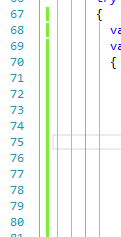
I'm trying to get the code highlighting feature to highlight entire lines of code, but instead the default behavior is to place colored blocks off to the left in the text editor as they appear in this screenshot.
If you see this how to video, https://youtu.be/NHWjRPIYerg?list=PLQ176FUIyIUZMTV6NoLkxKOf7H_6Jafg4&t=127, you'll see entire lines of code colored pink and green as seen in this screenshot.
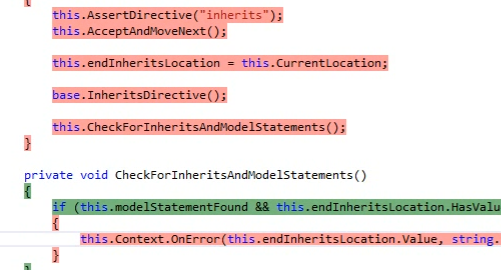
Is there a way to get dotCover to highlight the code itself as shown in the YouTube video?
Please sign in to leave a comment.
This change is the mentioned under the dotCover section of the 2016.3 highlights: https://blog.jetbrains.com/dotnet/2016/12/15/resharper-ultimate-2016-3-is-released/
That said, I would really prefer to have the code highlighted as Metroid requests rather than having little markers on the far left of the screen. For code that is even a little indented it can be difficult to determine at a glance which lines are uncovered.
It would be great if there was at least an option to highlight the code automatically.
Edit: I have downgraded to 2016.2 so that the code is highlighted.
Hi,
Yes, the new highlighting was introduced in ReSharper 2016.3, and currently, there's no way to enable "old" style highlighting.
Here's a request to provide an option to toggle "old" style highlighting: https://youtrack.jetbrains.com/issue/DCVR-8548. You are welcome to comment and vote for it.